Updated: March 21, 2026
Home › Side Hustles & Entrepreneurship › Income Scaling Strategies › Digital Transformation for Small Business: A Practical 2026 Playbook
Digital Transformation for Small Business: A Practical 2026 Playbook
TL;DR
— Digital transformation is not about adopting every available tool. It is about replacing the slowest, most manual parts of a business with integrated digital systems that are faster, more accurate, and less dependent on the owner’s direct involvement.
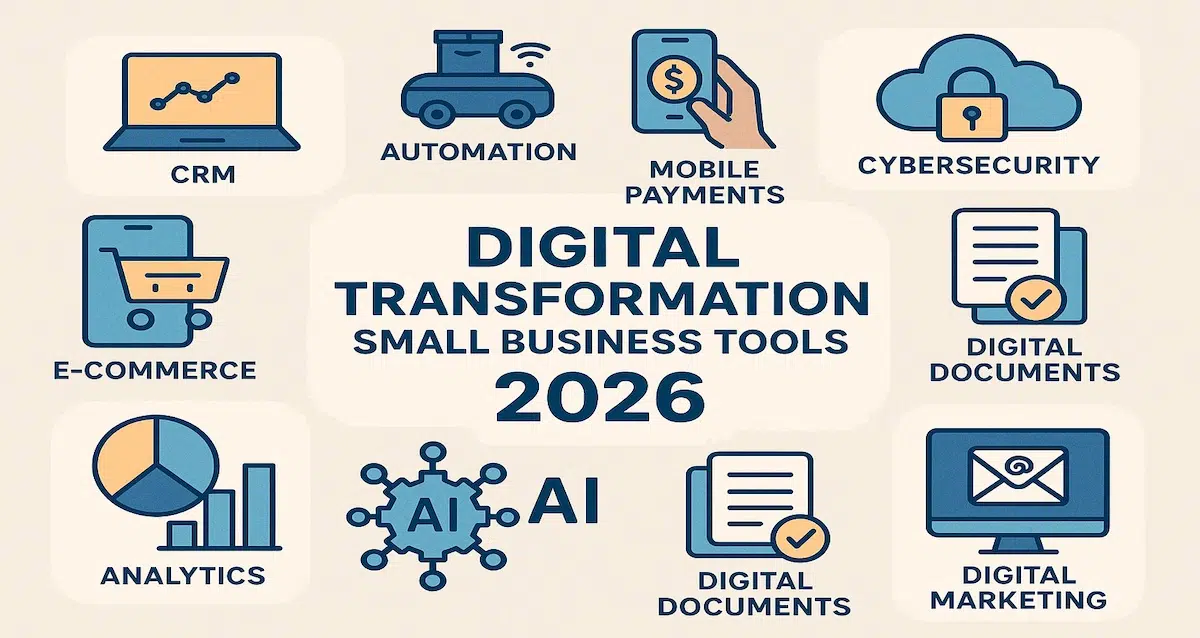
— The five core systems that every small business should have digitized in 2026 are: financial management, CRM and customer pipeline, workflow automation, customer experience, and cybersecurity. Each compounds the value of the others when they are integrated.
— The Federal Reserve’s business digitization research confirms that businesses adopting digital payment and cloud infrastructure show stronger revenue resilience during economic shifts — not because they are technically superior but because their operations continue functioning when conditions change.
— Start with the financial layer. Every other digital transformation decision is better when it is made from a position of financial clarity — accurate cash flow data, clean expense records, and a real-time view of business performance.
— Cybersecurity is not an optional upgrade. CISA data shows small businesses are now among the most targeted categories for ransomware and phishing attacks. Basic security measures prevent most attacks and cost significantly less than recovering from one.
Digital transformation sounds like a phrase reserved for corporate strategy presentations. For a small business owner managing clients, operations, finances, and marketing simultaneously, the practical meaning is simpler: replacing the parts of the business that are currently slow, manual, error-prone, or entirely dependent on the owner’s personal attention with digital systems that are faster, more reliable, and capable of running without constant supervision.
In 2026, the barrier to this kind of transformation is lower than it has ever been. The tools are accessible, most have free or low-cost entry tiers, and the implementation complexity for most small business use cases is manageable without dedicated technical support. What slows most small business digital transformation is not the technology — it is the absence of a clear sequencing framework for which systems to upgrade first and how each one connects to the others. This guide provides that framework.
Why Digital Transformation Is an Income Scaling Strategy
The connection between digital transformation and income scaling is direct. A business running on manual systems has a capacity ceiling defined by the hours the owner and team can work. A business running on integrated digital systems has a capacity ceiling defined by the systems — which can process more volume, respond faster, and operate consistently without proportional increases in human time investment. This is precisely how to scale your income beyond a side hustle: by building operational infrastructure that allows revenue to grow without requiring a proportional increase in working hours.
The Federal Reserve’s payments and digital finance research confirms that businesses that have adopted digital payment infrastructure and cloud-based operations demonstrate stronger revenue resilience during economic disruption — because their core operations continue functioning reliably when conditions change, rather than depending on physical presence or manual processes that disruption can interrupt. NIST’s AI framework research reinforces this: AI-enabled operations improve decision quality and response time in ways that compound over time as the data quality and system integration improve.
The income scaling case is not just theoretical. A business that has automated invoicing, follow-up, financial reporting, and customer intake can handle two to three times the client volume with the same staffing level compared to one managing those functions manually. That capacity leverage is what transforms a plateaued side hustle or small practice into a scalable business.
The Five Core Systems to Digitize First
Digital transformation produces the most return when systems are upgraded in an order that builds on each prior layer rather than in arbitrary order based on what sounds most interesting. The following sequence reflects which upgrades deliver the most immediate value and which ones require prior systems to be functional before they produce meaningful results.
System 1: Financial Management and Cash Flow
Financial digitization is the highest-return first transformation because accurate financial data is the foundation of every other business decision. A business that does not know its real-time profitability, cash position, or expense breakdown is making pricing, hiring, investment, and scaling decisions based on incomplete or stale information. Digital financial systems replace that uncertainty with clarity.
Cloud accounting platforms (QuickBooks, Xero, Wave) automate bank transaction import and categorization, invoice creation and tracking, expense recording, and financial report generation. For a business processing any meaningful transaction volume, this reduces monthly accounting time from hours to minutes while producing more accurate records than manual systems. Automated invoicing and payment processing through Stripe or Square eliminate the payment delays that create cash flow problems — automated reminder sequences recover overdue invoices without manual follow-up per client. Setting up quarterly estimated tax automations aligned with the IRS estimated tax schedule prevents the quarterly tax surprise that consistently disrupts cash flow for manually managed businesses.
For owners who want a real-time financial dashboard that aggregates business and personal accounts in a single view, Monarch Money (affiliate) provides cash flow visibility and spending pattern analysis across multiple accounts simultaneously. The Monarch Money review covers which operator profiles benefit most and how it integrates with dedicated accounting software. The automated budget system approach is covered in the Budgeting on Autopilot guide.
System 2: CRM and Customer Pipeline
A CRM system creates a single, organized record of every customer relationship, prospect interaction, and pipeline stage — replacing the combination of mental notes, email threads, and spreadsheets that most small businesses use to manage client relationships before they digitize this function. The income impact is direct: leads that are followed up systematically convert at higher rates than leads managed through manual recall.
HubSpot CRM’s free tier provides contact management, deal pipeline tracking, automated follow-up sequences, and email integration that covers most small business CRM needs without cost. When a new prospect fills out a contact form, the CRM can automatically add the contact, trigger a welcome email sequence, and schedule follow-up tasks — eliminating the manual orchestration per prospect that creates follow-up delays and inconsistencies. The revenue recovery from eliminating follow-up delays alone frequently justifies CRM adoption within the first month of use. Zoho CRM provides more advanced features at competitive pricing for businesses that outgrow HubSpot’s free tier capabilities.
System 3: Workflow Automation and AI
Workflow automation connects individual digital tools into coordinated systems where a single trigger produces a sequence of automated actions across multiple platforms. This is where individual tool efficiency multiplies into systemic operational leverage. Zapier connects over 5,000 business applications through trigger-and-action sequences — a new lead form submission can simultaneously add the contact to the CRM, send a personalized welcome email, create a project board task, and notify the relevant team member, all in seconds without manual intervention. Make (formerly Integromat) provides more sophisticated multi-step automation with conditional logic for complex workflow requirements.
AI overlays on these workflow systems add intelligence to the automation: AI can categorize incoming inquiries before routing them, draft response templates based on inquiry type, summarize project status from multiple data sources, and flag anomalies in financial or operational data that warrant human review. The combined effect of workflow automation and AI assistance is a business that handles more volume with more consistency than a manually operated equivalent. The full AI toolkit for small businesses is covered in the AI for Small Business guide.
System 4: Customer Experience Digitization
Customer expectations for digital-first interactions have set a new baseline in 2026. Instant booking, digital receipts, AI-powered FAQ responses, mobile-first website experience, and frictionless payment options are not competitive advantages — they are table stakes. Businesses that require customers to call to book appointments, receive paper invoices, or wait hours for responses to routine questions are creating friction that erodes customer satisfaction and reduces repeat business.
The customer experience digitization priorities in order of impact: online scheduling tools (Calendly, Acuity, or Square Appointments) that allow clients to book without back-and-forth communication; automated confirmation and reminder sequences that reduce no-shows without manual follow-up; digital payment options that allow immediate, frictionless payment at the moment of service; and AI-assisted FAQ and chat tools that provide instant responses to routine inquiries. Each of these improvements reduces friction in the customer relationship and reduces the owner’s time investment in administrative customer management simultaneously.
System 5: Cybersecurity
Cybersecurity is the most frequently deferred digital transformation investment and the one with the most asymmetric risk profile: the cost of basic protection is minimal; the cost of a successful attack — ransomware, data breach, phishing compromise of business accounts — is catastrophic. CISA data confirms that small businesses are among the most commonly targeted categories because they typically have less robust security than enterprise organizations while holding valuable customer data and financial account access.
The five baseline security measures that prevent the majority of small business cyberattacks: multi-factor authentication on all business accounts (email, banking, accounting, CRM); a business-grade password manager that generates and stores unique credentials for every account; automated cloud backups so that ransomware cannot permanently destroy business data; plugin and software update protocols that prevent exploitation of known vulnerabilities; and a basic firewall and malware protection layer for the business website. For WordPress sites, Jetpack Protect provides malware scanning and firewall capability at low cost. None of these require technical expertise to implement, and the combined annual cost is under $200 for most small businesses. The CISA cybersecurity best practices guide provides the authoritative small business security checklist at no cost.
The Four-Step Digital Transformation Playbook
Step 1: Audit your core systems for manual bottlenecks. Before selecting any tools, identify specifically where the business is slowest: which tasks require the most manual steps, which processes create the most errors when done manually, and which functions consume the most owner time for their revenue contribution. The highest-return digital transformation investments address the most painful bottlenecks, not the most impressive-sounding technology.
Step 2: Digitize the financial layer first. Cloud accounting, automated invoicing, payment processing, and quarterly tax reserve automation create the financial clarity that makes every subsequent technology decision more informed. A business with clean real-time financial data knows whether it can afford to add more tools, what its actual profit margins are, and how cash flow is trending — all of which are inputs to rational technology investment decisions.
Step 3: Add CRM and then workflow automation. Once the financial foundation is in place, CRM adoption creates the customer pipeline visibility that reveals where revenue is being lost. Workflow automation then connects the financial and CRM systems with other operational platforms, creating the integrated digital infrastructure where a single customer action triggers coordinated responses across multiple systems without manual intervention.
Step 4: Build toward SEO, analytics, and long-term organic growth. Once the operational systems are digitized and functioning reliably, strategic investment in organic search presence and content marketing creates a compounding growth channel. SEO-driven inbound traffic produces client inquiries without ongoing per-click advertising spend — the content creates consistent returns long after the initial creation investment. GA4 analytics provide the data on which content categories drive the highest-value traffic, enabling content investment to be directed toward the highest-return topics rather than spread across everything equally.
Digital transformation is not a one-time project. It is an ongoing process of replacing manual limitations with systems that scale.
The complete side hustles and entrepreneurship hub covers the full framework for building income, structuring business finances, and growing toward financial independence at every stage.
Explore Side Hustles & Entrepreneurship →Resources
NIST — Artificial Intelligence Resource Center
CISA — Cybersecurity Best Practices for Small Businesses
Federal Reserve — Payment Systems and Digital Finance
SBA — Strengthen Your Cybersecurity
IRS — Estimated Taxes for Self-Employed Individuals
This article is part of the Side Hustles & Entrepreneurship system on PersonalOne — a complete framework for building income outside your primary job at every stage.
Frequently Asked Questions
What is digital transformation for a small business?
Digital transformation for a small business is the process of replacing manual, paper-based, or disconnected systems with integrated digital tools that automate repetitive tasks, improve data accuracy, and allow the business to operate at higher volume without proportional increases in owner time or staffing costs. In practical terms, it means cloud accounting instead of paper ledgers, CRM instead of mental notes and email folders, automated invoicing instead of manual follow-up, and digital payment processing instead of cash-only or delayed billing. The transformation is completed in stages rather than all at once, with financial systems typically producing the highest immediate return on the first investment.
How long does digital transformation take for a small business?
The core financial, CRM, and automation systems can be configured and operational within 90 to 180 days for most small businesses without dedicated IT support. The sequencing matters more than the speed: rushing all five system categories simultaneously typically produces partial implementation of everything rather than complete implementation of the highest-priority systems. A more effective approach is completing one system category, verifying it is working reliably, and then moving to the next. The full integration value — where all five systems share data and trigger coordinated automations — typically emerges over six to twelve months as the individual systems are configured and connected.
Is digital transformation expensive for a small business?
The core systems are available at free or low-cost tiers that cover most small business needs at the early stages of implementation. HubSpot CRM core features are free. Wave accounting is free. Zapier free tier allows five active automations. CISA’s recommended baseline cybersecurity measures require minimal financial investment. A fully functional digital infrastructure covering all five system categories typically costs $100 to $300 per month in tool subscriptions, against time savings that for most businesses exceed eight to fifteen hours per week once the systems are running reliably.
What tools should I start with?
Start with the financial layer: cloud accounting (QuickBooks or Wave depending on revenue stage), automated invoicing and payment processing (Stripe or Square based on transaction type), and automated tax reserve transfers. Once financial clarity is established, add CRM (HubSpot free tier is the most accessible starting point) for pipeline and follow-up automation. Then connect the financial and CRM systems with workflow automation (Zapier) to eliminate manual data movement between platforms. Apply baseline cybersecurity measures in parallel with all of the above, not after.
How does digital transformation connect to income scaling?
A manually operated business has a capacity ceiling defined by available human hours. Every new client, every additional invoice, every follow-up required adds time to the owner’s schedule. A digitally transformed business has a capacity ceiling defined by the systems — which can handle higher volume with the same or lower owner time investment as the business grows. This is the operational infrastructure layer of income scaling: the systems that allow revenue to grow without requiring the owner to work proportionally more hours. Combined with the client acquisition, product, and financial strategies in the income scaling cluster, digital infrastructure is what makes income growth sustainable rather than exhausting.
Disclaimer: This content is for educational purposes only and does not constitute financial, legal, or technology advice. Tool recommendations reflect general suitability for small business use cases and do not constitute endorsements. Pricing and features change frequently — verify current details directly with each provider. Monarch Money is referenced via an affiliate link, which means PersonalOne may receive compensation if you sign up through that link, at no additional cost to you.