Updated: September 11, 2026
Home › Financial Automation › Budget Automation Systems › Automated Budgeting Tools
Part of Budget Automation Systems — using technology to reduce repetitive money tasks without giving up control of your budget.
What You Need to Know
— The best automated budgeting tools do more than display transactions. They reduce repetitive work such as syncing accounts, categorizing purchases, identifying recurring bills, and updating spending totals.
— “Free” does not always mean “fully automated.” Some free plans require manual transaction entry or reserve automation for paid tiers.
— Rocket Money and Empower currently provide useful free automation. EveryDollar has a free budget, but automatic bank importing requires Premium.
— Monarch Money, YNAB, and PocketGuard are not permanent free budgeting apps. They belong in this comparison because they show what additional automation paid tools provide.
— Choose the tool based on how much work you want the software to handle, not simply how many features appear on its sales page.
Most budgeting apps claim to make managing money easier. But there is a major difference between a tool that shows you what happened and one that actually reduces the work required to manage your budget.
The best automated budgeting tools can connect to your accounts, import transactions, categorize spending, identify recurring expenses, update budget totals, and help you see where your money is going without entering every purchase by hand.
That distinction matters.
A budgeting app can be free and still require a lot of manual work. A paid tool may automate far more, but the extra automation may not be worth paying for if all you need is a simple monthly plan.
Instead of ranking apps by popularity, PersonalOne compares them by a more practical question: How much of your budgeting work does the tool actually automate?
How We Ranked These Budgeting Tools
We are not treating every app that tracks spending as an automated budgeting system.
We looked at six areas:
Account Sync: Can the tool connect directly to financial accounts?
Transaction Import: Do purchases appear without manual entry?
Automatic Categorization: Does the software organize transactions automatically?
Recurring Expense Detection: Can it identify bills or subscriptions?
Budget Updating: Does spending automatically change budget totals?
Manual Work Required: How much ongoing input does the user still have to provide?
Pricing and features change frequently. The goal of this comparison is not to declare one app permanently “best.” It is to help you choose the level of automation that fits your money system.
Automated Budgeting Tools Compared
| Tool | Current Cost Type | Bank Sync | Automation Level | Best For |
|---|---|---|---|---|
| Rocket Money | Free tier + Premium | Yes | High | Free automation |
| Empower | Free | Yes | High | Big-picture tracking |
| EveryDollar | Free + Premium | Premium | Low free / Higher paid | Zero-based budgeting |
| Monarch Money | Paid after trial | Yes | Very High | All-in-one automation |
| YNAB | Paid after trial | Yes | Medium | Hands-on planning |
| PocketGuard | Paid after trial | Yes | Very High | Rules and recurring expenses |
1. Rocket Money — Best Free Option for Automation
Rocket Money currently offers one of the stronger combinations of free budgeting and automation.
The free version can connect financial accounts, track transactions, categorize spending, identify subscriptions, show upcoming bills, and provide basic budgeting tools.
Some of its more advanced features — including more extensive budgeting controls, faster syncing, automatic savings features, and certain subscription-management tools — require Premium.
Best fit: Someone who wants meaningful automatic tracking without immediately paying for a budgeting subscription.
2. Empower — Best Free Tool for Seeing the Whole Financial Picture
Empower's Personal Dashboard is different from a traditional category-by-category budget app.
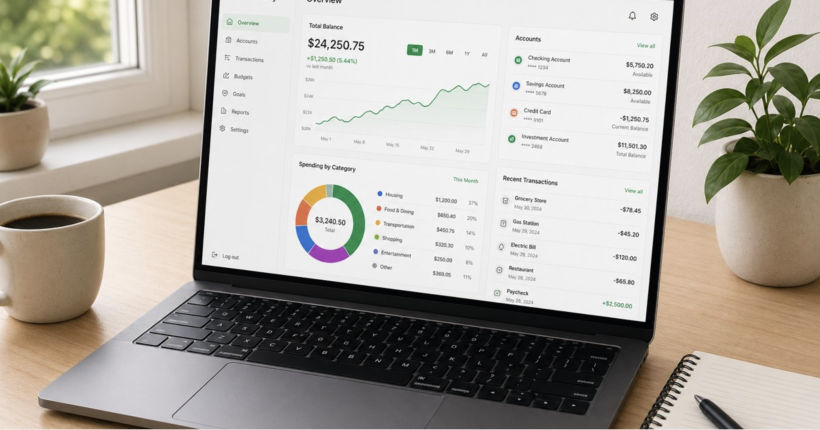
It can connect checking, savings, credit-card, loan, retirement, and investment accounts and bring them into one dashboard. Spending can be organized by categories and merchants while balances update from connected accounts.
The financial dashboard itself is free, which makes Empower particularly useful if your goal is to automate financial visibility rather than maintain a highly detailed zero-based budget.
Best fit: Someone who wants spending, cash flow, investments, debt, and net worth in one automatically updated view.
3. EveryDollar — Best Free Budget for People Who Want More Manual Control
EveryDollar is a good example of why “free budgeting tool” and “automated budgeting tool” are not always the same thing.
The free version lets you create a zero-based budget and manually enter transactions.
Automatic bank connection and transaction importing require EveryDollar Premium.
That means the free version is useful for planning, but it requires considerably more ongoing work than Rocket Money or Empower.
Best fit: Someone who wants a free zero-based budget and does not mind entering transactions manually.
4. Monarch Money — Best Paid All-in-One Automation
Monarch Money should no longer be presented as a free budgeting tool.
It offers a free trial, but continuing to use the platform requires a paid subscription.
Where Monarch stands out is automation depth. It connects financial institutions, imports transactions, categorizes purchases automatically, supports custom transaction rules, tracks cash flow and budgets, follows financial goals, and brings investments and net worth into the same system.
That makes it one of the better examples of the difference between free tracking and a more complete financial automation dashboard.
PersonalOne also has a deeper review of Monarch Money for readers considering the paid platform.
Best fit: Someone willing to pay for extensive account syncing, automatic categorization, household collaboration, and a broad financial dashboard.
5. YNAB — Best for People Who Want Automation Without Giving Up Planning
YNAB is not designed to remove every budgeting decision.
Its approach keeps the user involved in deciding what available money should do, while bank connections and transaction importing reduce some of the repetitive tracking work.
YNAB currently offers a free trial but is a paid service afterward. Eligible college students can receive a longer free trial under YNAB's student program.
This makes YNAB a better fit for someone who wants technology to reduce data entry but still wants to make active spending decisions.
Best fit: Someone who wants automation to assist budgeting rather than run the entire process in the background.
6. PocketGuard — Best for Automatic Transaction Rules
PocketGuard is another tool that should not currently be labeled permanently free.
It offers a trial followed by paid options.
Its automation strengths include connected accounts, recurring-bill tracking, transaction categorization, budgeting tools, goals, and transaction rules that can automatically rename, categorize, or tag future transactions.
Those rules can reduce one of the most annoying parts of connected budgeting apps: repeatedly correcting the same merchant or transaction category.
Best fit: Someone who values rule-based automation and wants recurring bills, transactions, budgets, and goals in one system.
Free Does Not Always Mean Automated
This is the distinction many budgeting-app lists miss.
A free tool can still be excellent. But if you have to enter every transaction manually, update every category yourself, and identify every recurring expense by hand, the tool is helping you budget without necessarily helping you automate.
Tracking tool: Shows you financial information.
Budgeting tool: Helps you create and monitor spending limits.
Automated budgeting tool: Reduces the recurring work required to keep that information current.
See It in Practice
Imagine Jordan wants a free budget. EveryDollar lets Jordan create one without paying, but Jordan has to enter transactions manually.
Jordan tries a tool with connected accounts instead. Purchases begin appearing automatically, spending categories update, and recurring charges become easier to identify.
Both are budgeting tools. Only one is reducing much of Jordan's repetitive budgeting work. That difference is what PersonalOne means by budget automation.
Which Automated Budgeting Tool Should You Choose?
Start with the problem you are trying to solve.
Want useful automation without paying?
Start with Rocket Money or Empower.
Want a free zero-based budget and do not mind manual entry?
EveryDollar may be enough.
Want maximum all-in-one automation?
Consider whether Monarch's paid platform justifies the cost.
Want deliberate hands-on budgeting with imported transactions?
YNAB may fit better.
Want strong recurring-expense and transaction-rule automation?
PocketGuard deserves consideration.
The best choice is not necessarily the tool with the most features. It is the tool that eliminates the repetitive work you actually dislike while keeping you involved in the decisions that still require judgment.
A Budget App Is Only One Part of the System
The next step is connecting your budgeting tool to the rest of your money system so bills, savings, debt payments, and spending work together.
Build Your Budget Automation System →PersonalOne Principle
Do not choose a budgeting app because it has the longest feature list. Choose it based on which repetitive money tasks it can reliably remove from your life.
Government Resources
Consumer Financial Protection Bureau — Your Money, Your Goals Toolkit
Consumer Financial Protection Bureau — Creating and Maintaining a Budget
Financial Automation: Budget software is one layer of a larger system. See how budgeting, savings, bills, debt payments, and investing connect in Financial Automation.
Frequently Asked Questions
What is the best free automated budgeting tool?
Rocket Money and Empower currently offer some of the strongest free automation. Rocket Money combines budgeting, transaction tracking, subscriptions, and bill information, while Empower is particularly strong for automatically bringing spending, accounts, investments, and net worth into one dashboard.
Is Monarch Money free?
No. Monarch offers a free trial, but continued access requires a paid subscription. That is why it belongs in the paid portion of this comparison rather than being labeled a free budgeting app.
Is EveryDollar free?
EveryDollar has a free version that lets users create budgets and manually track transactions. Automatic bank connection and imported transactions require its Premium service.
Is YNAB free?
YNAB offers a free trial but normally requires a subscription afterward. It also offers a longer free student trial to eligible college students.
What should an automated budgeting tool actually do?
At minimum, useful automation should reduce repetitive tasks such as importing transactions, categorizing spending, updating balances, recognizing recurring expenses, or keeping budget totals current.
Do I need a paid budgeting app?
Not necessarily. Start with the specific problem you need solved. If a free tool already handles the account syncing, transaction tracking, and budgeting you need, paying for additional features may not improve your financial system enough to justify the cost.