Updated: April 2026
Home › Financial Automation › Budget Automation Systems › How to Automate a Monthly Budget in 10 Minutes
TL;DR
— 10-minute setup, lifetime benefits — automate your monthly budget using simple tools already available through your bank.
— Automation eliminates the most common budget failures: missed payments, late fees, and forgotten savings transfers.
— Four-step system: connect accounts, automate bills and savings, create a dashboard, review monthly.
— Works with modern banking and FinTech tools already in place — no expensive software required.
— The real benefit: budgeting happens in the background while you focus on living your life.
Most monthly budgets fail not because the numbers are wrong but because they depend on making the right decisions repeatedly — every day, under every condition, indefinitely. That is an unsustainable standard. Automating a monthly budget replaces that ongoing decision requirement with a system that executes the plan whether you are paying attention or not.
This guide covers the exact four-step process for building an automated budgeting flow that handles bills, savings, and spending visibility with minimal ongoing maintenance. The setup takes approximately 10 minutes. Once running, the monthly time commitment drops to a single check-in of roughly the same length. This approach is part of the broader automated budgeting system designed to remove manual effort from money management while keeping you in full control of where every dollar goes.
Why Automating Your Budget Actually Matters
Budgeting fails most often not because people lack discipline or do not care about money — it fails because it relies on making correct decisions constantly. Every single day. Forever. That is an impossible standard that even the most organized person eventually cannot maintain.
Automation removes friction and replaces willpower with systems. Instead of requiring perfect behavior, automation makes good behavior the default path of least resistance. Bills pay themselves. Savings transfer before spending begins. The monthly review catches drift before it compounds rather than discovering it when the damage is already done.
The Real Benefits of Budget Automation
Less mental clutter: fewer daily money decisions means fewer opportunities for mistakes and decision fatigue
No late fees: autopay keeps bills on schedule regardless of how busy life gets
Consistent savings: money moves before you can spend it — removing temptation entirely
Better credit scores: perfect payment history happens automatically without manual tracking
Reduced financial stress: knowing everything is handled produces genuine peace of mind
Think of automation as guardrails for your money — not restrictions that limit freedom, but protective systems that keep you on track without requiring constant vigilance. You stay in complete control without needing to check balances multiple times daily or remember dozens of due dates.
Manual Budgeting vs Automated Budgeting
Before automation: weekly spreadsheet updates, missed bill reminders, constantly checking balances. Saving money depended on willpower and remembering to transfer funds manually.
After automation: bills paid themselves, savings moved automatically after payday, spending stayed visible through one dashboard. Budgeting shifted from daily effort to a 10-minute monthly check-in.
Time spent: reduced from hours per month to about 10 minutes
Missed payments: eliminated through autopay
Savings consistency: improved significantly by automating transfers
Stress level: substantially lower due to fewer active money decisions
This shift does not require extreme discipline or complex spreadsheets. It works because the system handles money movement automatically while you stay focused on outcomes rather than transactions. The Monarch Money review shows how a centralized dashboard makes automated budgeting easier to maintain long term.
Tools You Need to Get Started
The good news is that you probably already have everything required. The goal is simplicity and reliability, not complexity or expensive software.
The essential components are a budgeting app or dashboard that syncs accounts (many banks offer this built-in), a checking account that supports autopay and scheduled transfers (most modern banks and credit unions do), and a savings account for automated deposits ideally held at a separate institution for psychological separation. A simple spreadsheet for monthly visibility is optional but useful for people who prefer a manual overview alongside automated execution.
Premium subscriptions and complex financial software are not required. Existing bank accounts paired with a straightforward system that blends structure and automation are sufficient for most people. This approach builds naturally on the principles behind modern budgeting systems that combine cash discipline with technology — the automation layer executes the same behavioral discipline that manual cash systems enforce, without requiring the manual effort.
Step 1: Connect and Review Your Accounts
Start by syncing your checking, savings, and credit cards to one central tool or dashboard. This creates a clear snapshot of how money actually flows in and out each month — often revealing spending patterns that were not visible when accounts were managed separately.
The initial review covers five things: spending categories from the past 60 to 90 days to understand actual behavior, identification of fixed bills versus flexible spending, due dates for all recurring payments, average monthly spending by category, and realistic category targets based on actual behavior rather than aspirational minimums.
The critical principle at this stage is to base the automated budget on reality, not ideals. If actual grocery spending runs $400 per month, the budget should reflect $400 — not the $250 that would be preferred. Automation only works consistently when the underlying numbers reflect real behavior. Optimization comes later; accuracy comes first.
Step 2: Automate Savings and Bill Payments
This is the step where the system starts working for you, removing the need for ongoing manual decisions and payments.
Fixed bills on autopay: every recurring bill with a consistent amount should be automated. Rent or mortgage payments, utilities, insurance premiums, streaming subscriptions, credit card minimum payments, and loan payments all belong on autopay. The goal is zero manually triggered bill payments remaining in the monthly workflow.
Savings automated immediately after payday: the pay-yourself-first principle works because it happens before spending decisions begin. Set up automatic transfers for one to two days after your paycheck deposits. An emergency fund contribution goes first until a three to six month buffer exists. Specific goal accounts — vacation fund, down payment, car replacement — follow. Retirement contributions above what is automatically deducted from your paycheck complete the savings automation stack.
If your employer offers direct deposit splitting, allocating percentages directly to savings and checking at the payroll level is the most effective approach. The money never enters the spending account, which means the decision to save is never presented in a moment when spending feels more pressing.
Strategic buffer in checking: maintain a small cushion of $500 to $1,000 in your checking account to prevent overdrafts from timing mismatches between automated payments and paycheck deposits. This buffer ensures automation never triggers fees or declined payments due to a one or two day timing gap.
Step 3: Create a Simple Budget Dashboard
A dashboard provides visibility without requiring micromanagement. The goal is quick monthly check-ins, not daily tracking that becomes its own burden and reintroduces the friction automation was designed to remove.
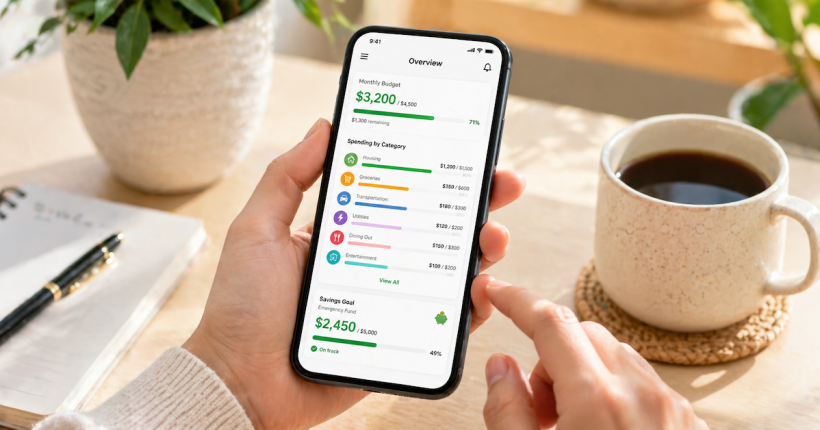
The dashboard needs to show four things: monthly totals by category (not every transaction, just category summaries), budgeted versus actual spending for a quick visual comparison, categories consistently running over budget that need realistic adjustment, and savings progress tracking emergency fund and goal balances.
This does not need to look like a corporate financial model. Clean, readable, and fast to review is the objective. Three tiers work depending on preference. A low-tech option is a simple spreadsheet with monthly totals updated once per month. A mid-tech option uses your bank’s built-in spending tracker. A high-tech option uses a dedicated budgeting app that updates automatically. All three produce adequate visibility. The right choice is whichever one will actually be opened and reviewed consistently.
Step 4: Review and Optimize Monthly
Automation does not mean ignoring your finances entirely — it means checking in less frequently but more intentionally. The monthly review ensures the automated system stays aligned with actual life rather than drifting out of sync with income changes, new expenses, or shifting spending patterns.
The 10-minute monthly review covers six things: verifying all automated transfers and payments executed correctly, reviewing spending by category for surprises or consistent overruns, adjusting savings percentages if income changed, accounting for upcoming one-time expenses like annual insurance or gifts, updating category budgets if spending patterns shifted permanently, and noting savings milestones and wins that reinforce the system’s momentum.
Ten minutes once per month is genuinely enough to keep the system running correctly. This replaces the hours traditionally spent on weekly or daily manual budgeting — with better outcomes and significantly less ongoing stress.
Troubleshooting Common Automation Problems
Even well-designed automated systems encounter occasional issues. Here is how to resolve the most common ones without abandoning the system.
Overdraft from timing mismatch: increase the checking account buffer or schedule automated transfers three to four days after payday rather than immediately. This gives the paycheck time to clear fully before automated payments draw against it.
Savings transfer too aggressive: reduce the automatic percentage temporarily. Saving 10 percent consistently produces better long-term results than saving 20 percent and having to reverse it repeatedly. The habit and the system matter more than the initial rate.
Spending consistently over budget in a category: the budget is wrong, not the spending. Adjust the allocation to reflect reality, then identify where genuine optimization is possible once the budget is accurate. A budget that consistently shows overage in the same category is telling you the target needs to move, not that the behavior needs to change immediately.
Forgotten to update after income change: set a calendar reminder quarterly to review and adjust automated percentages based on income changes. Income rarely stays exactly the same year to year, and a 15-minute quarterly review prevents the entire system from drifting out of alignment with actual financial reality. The complete financial automation framework covers how to scale the system as income and financial complexity grow over time.
Automation is the tactic. The system is what scales it.
This four-step setup automates the execution. The complete Budget Automation Systems framework connects bills, savings, debt, and investing into a single flow that runs without constant management.
Explore the Budget Automation Systems Guide →Automating a monthly budget is not about giving up control — it is about building a system that works even when life gets busy, chaotic, or overwhelming. The goal is consistent financial behavior without requiring constant effort or perfect discipline every day.
When money runs on a structured automated system, consistency becomes effortless. Bills pay themselves. Savings grow automatically. Credit scores improve without active management. The mental space previously consumed by tracking due dates and checking balances becomes available for decisions that actually matter — income growth, career moves, and long-term financial planning rather than daily financial administration.
Start with one automated element today. Set up an automatic savings transfer or enable autopay on one recurring bill. Add another element next week. Within a month the complete system is running and the 10-minute monthly review is the only ongoing requirement.
Resources
CFPB — Budget Worksheet and Planning Tools
CFPB — How to Create a Budget and Stick With It
FDIC — Money Smart Financial Education Program
Federal Reserve — Report on the Economic Well-Being of U.S. Households
Continue Learning About Financial Automation
This article covers the tactical setup for automating a monthly budget. The complete framework for connecting automation across bills, savings, debt, and investing is in the Financial Automation authority hub.
Frequently Asked Questions
Is it safe to link bank accounts to budgeting apps?
Reputable budgeting apps use bank-level encryption and read-only access to your accounts — they can see transactions but cannot move money or make changes. Look for apps that are SOC 2 certified and use 256-bit encryption. If extra caution is preferred, manual tracking without account linking is always an option, though it requires more ongoing effort and reintroduces the manual work automation is designed to eliminate.
How much should I automate toward savings?
Start with 10 to 20 percent of take-home pay as a baseline, then adjust based on income, expenses, and financial goals. If 10 percent feels sustainable after a few months, increase to 15. The priority is consistency — automating 10 percent reliably produces better long-term results than automating 25 percent and reversing it repeatedly. The system only compounds when it runs without interruption.
What happens if I overspend in one category?
Use the checking account buffer to cover the overage, then either reduce spending in another category to rebalance or adjust next month’s budget to be more realistic. Budgets are systems designed to serve you — not scorecards for perfect behavior. The goal is awareness and progressive improvement, not flawless execution from month one.
Should I automate credit card payments?
Always automate at least the minimum payment to prevent late fees and credit score damage. Automating full balance payment is the better option when cash flow allows. If balances are carried, automate payments above the minimum to reduce interest costs faster. The critical requirement is ensuring sufficient funds are in the checking account on the payment date — the buffer maintained in Step 2 covers this.
How often should I check an automated budget?
Once per month for approximately 10 minutes is sufficient for most people once the system is established. The monthly check-in verifies execution, catches any category drift, and allows adjustments for life changes. During the first month, a weekly five-minute check is worth doing to confirm the automation is executing correctly before reducing the review frequency.
What is the biggest mistake people make when automating a budget?
Setting up automation and then never reviewing it. Life changes — income increases, expenses shift, goals evolve — and an automated system that was calibrated for last year’s financial picture will drift out of alignment if it is never updated. The monthly review is not optional maintenance. It is what keeps the automation executing the right plan rather than just executing a plan automatically.
Disclaimer: This article is for educational purposes only and does not constitute financial advice. Individual financial situations vary significantly based on income, expenses, obligations, and personal circumstances. Automated budgeting strategies should be adapted to your specific situation and goals. Always ensure sufficient funds are available in accounts before authorizing automatic payments or transfers to avoid overdraft fees. Bank and app features, fees, and availability are subject to change. Consult qualified financial professionals before making significant changes to your financial management systems. PersonalOne is not responsible for decisions made based on this content.