August 1, 2026
Home › Financial Automation › Banking Infrastructure Automation › How to Set Up Income Routing on Payday
Part of Banking Infrastructure Automation — building the money-flow system that runs itself.
What You Need to Know
— Income routing means your paycheck splits automatically across accounts the moment it's deposited, before you ever see a single dollar in checking.
— Most split-deposit setups involve a "fixed amount" destination and a "remainder" destination. Getting the order wrong is the single most common reason a split silently fails to fund savings.
— Fixed dollar amounts work well for predictable salaries. Percentages work better for variable or commission-based income, since a fixed amount can wipe out a smaller-than-usual paycheck.
— Setup happens through your employer's payroll system, not your bank, so the request goes to HR or payroll, not customer service.
— Changes typically take one to two pay cycles to activate, so don't expect the very next paycheck to reflect a new split.
How to set up income routing so money goes where it should on payday comes down to one core mechanic: splitting your direct deposit at the source, so bills, savings, and spending each get their share automatically, before any of it lands in the account you actually spend from.
Most guides on this stop at "ask your employer to split your paycheck." That's real advice, but it skips the part that actually determines whether the split works as intended: how you configure which account gets a fixed amount and which one absorbs whatever's left. Get that order wrong, and a split that looks correctly set up can quietly send $0 to savings every single payday, month after month, without any error message or notification telling you something's off.
How Income Routing Actually Works
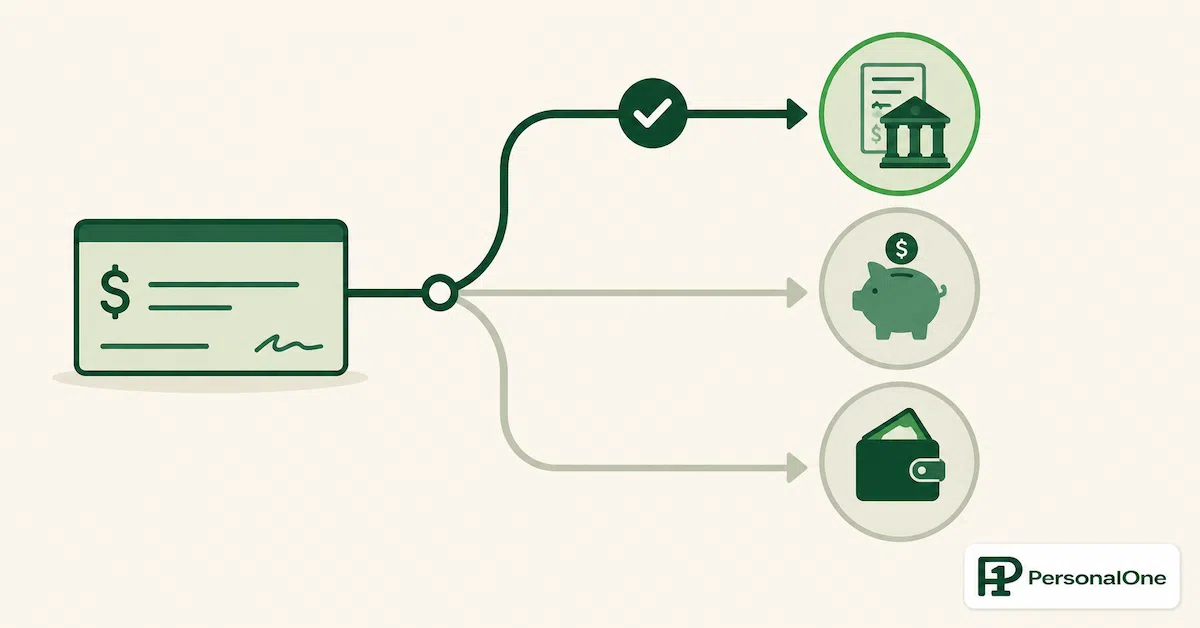
When your paycheck is deposited via direct deposit, your employer's payroll system, not your bank, controls how it's distributed. A standard setup sends 100% to a single account. A split setup divides that same deposit across two or more accounts in one transaction, using either a fixed dollar amount, a percentage, or a combination of both.
The money moves through the Automated Clearing House network, the same electronic system that processes all direct deposits, and each portion of a split arrives as its own separate transaction. This means your bank statement will show multiple deposits on payday rather than one, each landing in its designated account at essentially the same moment, usually within minutes of each other.
Because this configuration lives in your employer's payroll system, changing it requires going through payroll or HR, not your bank. Most major payroll platforms, ADP, Gusto, Paychex, Workday, and others, support splitting natively, so the feature is almost certainly available even if nobody at your workplace has mentioned it. It's rarely advertised proactively, which is likely why so many people go years without realizing the option exists at all.
The Ordering Mistake That Breaks the Split
Every split configuration involves designating accounts as either a fixed-amount destination or a remainder destination. Fixed accounts receive a specific, predetermined dollar amount every payday. The remainder account receives whatever's left after every fixed amount has been allocated.
How the Split Silently Fails
A paycheck splits into: Checking (fixed at $2,400) and Savings (remainder). If checking is configured correctly as the fixed amount and savings as remainder, a $3,000 paycheck sends $2,400 to checking and $600 to savings automatically. That's the intended result.
But if the accounts get reversed during setup, checking accidentally configured as "remainder" instead of "fixed," the entire paycheck can route to checking first, leaving nothing for savings to receive as its own fixed amount. The split still technically exists in the system. It just isn't doing what you think it's doing.
This isn't a rare misconfiguration. It's one of the most commonly cited setup errors in payroll documentation, precisely because the two settings look similar on a form and the consequence of getting them backward isn't obvious until you notice savings hasn't grown in a few months. Double-checking which account is designated "remainder" versus "fixed" during setup, and confirming it on your first split paycheck, catches this before it costs you months of missed savings.
The reason this trips people up so consistently comes down to how payroll forms present the choice. Most forms simply list your accounts with a dropdown or checkbox for "fixed amount" or "percentage," without visually distinguishing which one is functioning as the catch-all destination for everything else. If you're filling this out quickly, checking accounts, tabbing through fields, it's easy to designate your primary checking account with a specific dollar figure out of habit, accidentally making it the fixed destination when your intention was the opposite.
There's a simple way to sidestep this entirely: designate savings, not checking, as the account receiving the fixed dollar amount, and let checking absorb the remainder. This flips the usual instinct, but it guarantees your savings goal is met exactly as intended every single payday, since a fixed amount can't be shorted the way a remainder amount can. Checking simply receives whatever's left, which is exactly how a spending account should function anyway, since spending is inherently the most flexible category in any budget.
A useful sanity check before submitting: read the configuration back to yourself in plain terms, "checking gets whatever's left after savings takes its fixed share," rather than just trusting the form fields as entered. That one sentence test catches the reversed setup far more reliably than scanning a form full of similar-looking dropdown menus and dollar figures.
Fixed Amount vs. Percentage: Which to Use
Fixed dollar amounts work well when your income is predictable. A salaried employee earning the same paycheck every cycle can set a fixed $400 to savings with confidence, since the remaining amount reliably covers everyday spending without surprises or unexpected shortfalls.
Percentages work better for variable or commission-based income. A fixed $400 allocation is fine on a strong paycheck but can be genuinely disruptive on a smaller one, potentially leaving too little in checking to cover bills that week. A percentage, say 10%, scales automatically: a smaller paycheck sends a smaller amount to savings, and checking still receives a proportional share either way, which removes the guesswork of predicting exactly how much any given paycheck will be before it arrives.
Some payroll systems support blending both: a small fixed amount to guarantee a baseline savings contribution, plus a percentage on top for anything above a certain paycheck size. This hybrid approach is worth asking about specifically if your income has some predictable floor with occasional larger paychecks on top, commission, bonuses, or overtime.
Routing Income Across More Than Two Accounts
A two-account split, checking and savings, covers the basics, but a more complete system often separates further: a dedicated bills account, a spending account, and a savings account, each receiving its own designated share directly from payroll rather than being sorted out manually after the fact inside a single checking account.
When routing across three or more accounts, only one can function as the remainder destination; every other account needs a fixed amount or percentage explicitly assigned. This matters because it's easy to assume multiple accounts can each be "whatever's left," when in practice payroll systems process fixed allocations in a defined order and only the last unallocated account absorbs the true remainder.
A practical sequencing approach: assign your bills account a fixed amount that covers your known monthly obligations, assign savings a fixed amount or percentage next, and let your spending account serve as the remainder. This way, essentials are guaranteed to be funded first, savings happens automatically without competing for what's left, and spending money reflects an honest, already-accounted-for number rather than an inflated one that assumes bills haven't been paid yet. This sequencing mirrors the same "pay yourself first" logic behind most successful automated budgeting systems, just applied at the payroll level instead of after the money has already reached a single account.
Setting It Up, Step by Step
Gather account and routing numbers for every destination account. You'll need this information for each account before starting the request, whether that's two accounts or four, so pull it from your banking app in advance rather than scrambling for it mid-request.
Decide your split method and amounts before submitting the request. Know exactly which accounts get fixed amounts, which gets the remainder, and whether any portion should be percentage-based, rather than figuring it out mid-conversation with payroll.
Submit the request through HR or your payroll self-service portal. Many employers offer this directly through an employee portal without requiring a conversation with anyone; others use a paper or digital authorization form, and the exact location of the setting varies by payroll platform, so ask directly if you can't find it.
Confirm which account is designated as the remainder account. This is the single check most worth doing twice, given how easily it gets configured backward.
Check your first split paycheck carefully. Verify that each account received the expected amount before assuming the setup is correct and moving on.
What If Your Employer Doesn't Offer Split Deposit
Not every employer supports split direct deposit, even though most major payroll platforms technically allow it. If yours doesn't, or if the process feels like too much friction to set up through HR, an automated bank-side transfer accomplishes something close to the same result without requiring any change on the employer's end at all.
Your full paycheck lands in one account, then a scheduled transfer moves a set amount to savings a day or two later. This isn't quite as clean as splitting at the source, since the money technically sits in checking briefly first, but a same-day or next-day automated transfer captures most of the benefit without needing payroll involvement at all.
Set the transfer date carefully. Scheduling it for the exact day your paycheck typically deposits can occasionally cause a race condition if the deposit posts a few hours later than expected, leaving insufficient funds for the transfer to complete. Building in a one-day buffer, scheduling the transfer for the day after your typical deposit date, avoids this entirely while still moving the money before it has much chance to be spent on something else.
Whichever method you use, the underlying goal is the same: money should be routed to its final destination automatically, without a manual decision required every payday. Our guide to sequencing bills, savings, and spending covers what happens after income routing gets the money into the right accounts in the first place.
When to Revisit Your Split
A routing setup that made sense when you first configured it doesn't necessarily stay accurate forever. Income changes, a raise, a new job, a shift from salary to variable pay, and expenses change too, a rent increase, a new financial goal, a debt getting paid off freeing up room for more savings.
A useful trigger for revisiting the split: any time your take-home pay changes by more than a small percentage, or any time a fixed monthly obligation changes meaningfully, a rent increase, a new loan payment, a debt getting paid off. Rather than letting the original split run indefinitely on autopilot, treating it as a setting worth revisiting once or twice a year keeps the routing aligned with your actual financial picture instead of one that was accurate months or years ago.
This is particularly relevant right after a raise. Updating the fixed amount going to savings by the size of the raise, rather than leaving the old fixed number in place, ensures the increase doesn't simply expand what checking receives as remainder, which is one of the most common ways a raise disappears into daily spending without a single deliberate decision being made about it. A five-minute update to your split, done once per raise, does more for long-term savings than months of good intentions ever will.
Build a Banking System That Runs Itself
Income routing is the first piece of a complete automation system. The Banking Infrastructure Automation hub covers sequencing, overdraft-proofing, and what to do when automation fails.
More From This Hub
Return to Financial Automation for the complete system — banking infrastructure, budget automation, savings automation, debt automation, and investment automation.
Frequently Asked Questions
How long does it take for a split direct deposit to start working?
Typically one to two pay cycles after your employer processes the request. Don't be alarmed if your very next paycheck still arrives as a single deposit; that's normal while the change is being processed on the payroll side.
Can I split my paycheck across more than two accounts?
Most modern payroll systems support splitting across three to five accounts. If you want separate destinations for bills, savings, and a specific goal like an emergency fund, that's usually achievable within a single split configuration, though it's worth confirming the exact maximum your specific employer's payroll platform allows before designing a more complex split.
What happens if I change jobs? Does the split carry over automatically?
No. Split direct deposit is configured within each employer's specific payroll system, so a new job means setting it up again from scratch with your new employer's payroll platform. It's worth adding this to your new-job checklist alongside benefits enrollment, since it's easy to forget during the flurry of a job transition and end up with a full paycheck landing unsplit in checking for weeks or months before anyone notices.
Should I route tax refunds and other one-time deposits the same way?
You can. The IRS allows splitting a federal tax refund across up to three accounts using Form 8888, using the same underlying logic, a fixed amount or percentage to each destination, as a payroll split, which makes it a useful way to guarantee a windfall gets partially saved rather than fully absorbed into checking.
Is there a downside to using a bank-side transfer instead of splitting at the source?
The main tradeoff is that a bank-side transfer requires the full amount to briefly appear in checking before moving, which can matter if a delayed transfer or a same-day large expense conflicts with the schedule. A source-level payroll split avoids this timing gap entirely.
What if my paycheck amount varies and I can't predict a fixed savings number?
Use a percentage instead of a fixed dollar amount for the variable portion of your income. A percentage scales automatically with whatever the paycheck actually is, so a smaller check still contributes proportionally to savings without risking an overdraft the way a flat fixed amount could on a lean paycheck, and a strong paycheck automatically sends more to savings without requiring you to remember to adjust anything manually.
This content is for educational purposes only and does not constitute financial advice. PersonalOne is not a licensed financial advisor, broker, or investment professional. Individual financial situations vary — consult a qualified financial professional for personalized guidance.