Updated: February 2026 • 9 min read
Home › Banking Systems › Bills System That Never Overdrafts › How to Switch to a No-Fee Bank Without Missing a Payment
About the Author
Don Briscoe is a Financial Systems Coach with 12+ years of experience helping Millennials and Gen Z escape paycheck-to-paycheck cycles. He founded PersonalOne on a framework-first philosophy — less willpower, more infrastructure — and provides structured, honest, free financial education.
How to Switch to a No-Fee Bank Without Breaking Your Bill Payments
Americans paid over $12 billion in overdraft fees in 2024 alone. Switching banks is the fix — but only if you do it in the right order. This is the step-by-step system that moves your money without missing a payment.
TL;DR
- No-fee banking is the standard now: Gen Z and Millennials are driving a mass exodus from banks that charge $15–$35 monthly just to hold your money
- The switch has one rule: Never close your old account until every automatic payment and deposit has successfully moved to the new one
- The process takes 30 days: Open new account, list all automations, move them one by one, confirm one full billing cycle, then close old account
- Direct deposit moves in 1–2 pay periods: Contact HR with your new account and routing number — most employers process the change within two paycheck cycles
- Hidden fees you should stop paying immediately: Monthly maintenance, minimum balance, overdraft, out-of-network ATM, and paper statement fees
Why Gen Z and Millennials Are Leaving Traditional Banks
Digital natives grew up with free social media, free messaging, and free cloud storage. Paying $30 a month for a checking account that earns 0.01% APY feels absurd when no-fee digital banks exist that charge nothing, reimburse ATM fees, and offer early direct deposit as a baseline feature.
The problem isn't knowing a better option exists — it's making the switch without disrupting the automatic payments, subscriptions, and direct deposits wired to your current account. Done in the wrong order, switching banks creates bounced payments, overdraft fees on the old account, and exactly the kind of financial chaos you're trying to escape.
This guide gives you the exact switching sequence that avoids every one of those traps. Follow it in order and the transition takes 30 days with zero disruption. This article is part of the Bills System That Never Overdrafts hub — if you haven't set up your bills account yet, start there first.
The Hidden Fees You're Probably Paying Right Now
Traditional banks have mastered layering fees that individually seem small but collectively drain hundreds from your account annually. Before you switch, tally what your current bank is actually costing you.
Monthly Maintenance Fee
$12–$35/month just to have an account. Often waived only with high balances or direct deposit minimums most people don't maintain.
Overdraft Fee
$25–$38 per transaction. Some banks charge multiple overdraft fees in a single day. The $12 billion Americans paid in 2024 came almost entirely from lower-income account holders.
Out-of-Network ATM Fee
$3–$5 from your bank plus $3–$5 from the ATM owner. Using an out-of-network ATM twice a month adds $144–$240 per year.
Minimum Balance Penalty
Falling below a required minimum ($500–$1,500 at many banks) triggers monthly fees. Essentially a tax on not being wealthy enough.
Wire Transfer Fee
$15–$30 per domestic wire. Most no-fee banks offer free ACH transfers that accomplish the same thing in 1–3 business days.
Paper Statement Fee
$2–$5/month for mailed statements most people never open. Easy to forget. Set to paperless immediately on any new account.
What to look for in a true no-fee account: No monthly maintenance fee regardless of balance. No minimum balance requirement. ATM fee reimbursements. No overdraft fee or overdraft protection alternatives. Read the fee schedule — not just the marketing language — before opening.
The 6-Step Bank Switching System
This sequence is designed around one rule: your old account stays active and funded until everything has successfully moved. Closing early is the only way to do real damage.
Open Your New Account and Fund It
Choose your no-fee bank (research no-fee options like Chime, SoFi, Ally, and Current before opening). Open the account online — most take 5–10 minutes. Fund it with a small initial deposit ($25–$50) to activate it. Do not move your primary balance yet. Both accounts stay funded through the entire transition.
Build Your Complete Automation List
Pull up your last 3 months of bank statements and flag every automatic debit and credit. You need two lists:
OUTGOING (auto-debits)
- Rent or mortgage
- Utilities (electric, gas, water)
- Streaming subscriptions
- Insurance premiums
- Loan payments
- Gym memberships
- Any recurring subscription
INCOMING (auto-credits)
- Direct deposit (paycheck)
- Side hustle payments
- Government benefits
- Tax refunds (if scheduled)
- Freelance platform payouts
- Reimbursements
Reroute Your Direct Deposit First
Direct deposit is the most important update because it's your income. Contact your HR department or payroll platform and provide your new account number and routing number. Most employers process the change within 1–2 pay periods. Until you confirm the first successful deposit lands in your new account, keep your old account open and funded. Many no-fee banks provide a direct deposit form you can hand directly to HR to simplify the update.
Move Automatic Payments Gradually Over 30 Days
Don't update everything at once. Work through your outgoing list systematically — log into each biller's website or app and update the payment method to your new account. Prioritize high-risk items first: rent, loan payments, insurance. Move 2–3 per week so you can monitor each one before moving the next. Check your old account daily during this period to catch any charges that weren't on your list.
Let One Full Billing Cycle Complete
After you've updated every item on your list, wait for one full 30-day billing cycle before closing anything. Monthly billers that hit on different dates — the 1st, the 15th, the 28th — all need to fire at least once from your new account before you're clear. Monitor both accounts during this window. Any charge that still hits the old account tells you something was missed. Fix it before moving on.
Transfer Remaining Balance and Close the Old Account
Once the full billing cycle completes clean — no unexpected charges on the old account — transfer your remaining balance to the new account. Call or visit the old bank to formally close the account and request a written confirmation. Don't just let it sit at zero. An open account with no balance can still generate fees or be flagged by ChexSystems if a forgotten charge hits after you've stopped monitoring it.
The Double-Fee Trap — And How to Avoid It
The most common bank switching mistake: closing the old account too soon. Here's exactly what happens when you do it wrong.
What Goes Wrong When You Close Too Early
Forgotten subscription fires
Annual charges — Amazon Prime, domain renewals, insurance — hit once a year. Easy to miss on a 30-day statement review. If the account is closed, the charge bounces and may go to collections.
Overdraft on closed account
Some banks process pending transactions after an account is closed and charge overdraft fees on the resulting negative balance. You now owe money to the bank you just left.
ChexSystems flag
Unpaid bank fees get reported to ChexSystems — the banking equivalent of a credit bureau. A ChexSystems flag can prevent you from opening new bank accounts for up to 5 years.
Direct deposit misdirect
If your employer processes payroll before the update takes effect, your paycheck lands in the closed account and gets bounced back — delaying your pay by days while your new account sits empty.
The fix for all of these: Maintain a small buffer ($50–$100) in your old account through the full 30-day transition window. It costs you nothing, and it catches any surprise charge that fires before you've completed the move.
What to Look for in a True No-Fee Bank
Not all "no-fee" banks are equal. Some waive fees only under specific conditions. Here's the checklist for evaluating any no-fee account before you open it.
| Feature | What to Look For | Red Flag |
|---|---|---|
| Monthly Fee | $0 always — no conditions | "Waived with direct deposit" — means you pay if income dips |
| Overdraft | $0 fee or small advance option | Any per-transaction overdraft fee |
| ATM Access | Large fee-free network or reimbursements | Reimbursements capped at $5–$10/month |
| Minimum Balance | $0 required at all times | Any required minimum to avoid fees |
| Early Direct Deposit | Up to 2 days early — standard with most digital banks | Charges a fee for early access |
| FDIC Insurance | Clearly listed — up to $250,000 | Not mentioned or buried in fine print |
For a full comparison of which digital banks and neobanks meet these standards in 2026, verify current account terms directly with each institution before opening.
Where This Fits in Your Financial System
Bills System That Never Overdrafts
This switching guide is one piece of the complete bills system. The hub covers how to structure your bills account so automatic payments never create overdrafts.
Banking Systems Hub
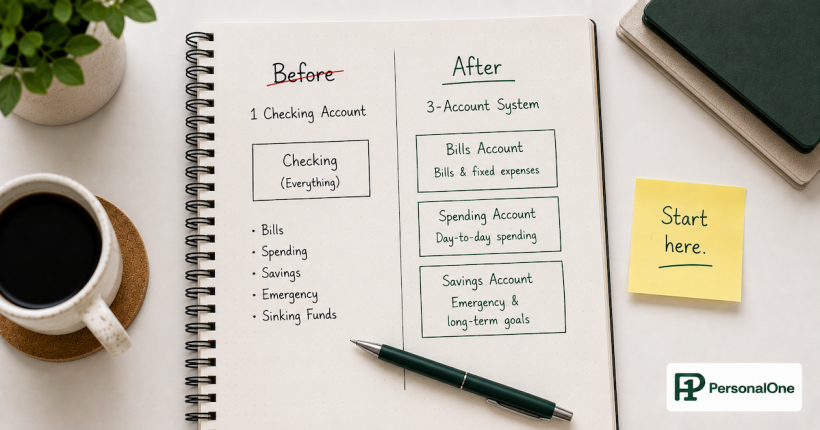
Switching to a no-fee bank is one piece of a complete banking architecture. The Banking Systems hub covers how to structure multiple accounts, route income, and build the account system underneath your automation.
Frequently Asked Questions
How long does it actually take to switch banks?
The full process takes 30 days when done correctly. Opening the new account takes 5–10 minutes. Moving automations takes 1–2 weeks of gradual updates. The final step is waiting one full billing cycle to confirm everything moved cleanly before closing the old account. Trying to do it faster creates the exact fee and payment disruption problems you're trying to avoid.
What happens to pending transactions when I close my old account?
Some banks will still process pending transactions after account closure and charge overdraft fees if the balance is zero. This is one of the most common closing traps. Always confirm with your old bank what their policy is on pending transaction processing at account closure, and make sure your balance covers any outstanding transactions before initiating the close.
Will switching banks affect my credit score?
Opening or closing checking and savings accounts does not directly affect your credit score because they're not credit products. However, if your old bank charges fees after you close the account and sends an unpaid balance to collections, that collection can appear on your credit report. This is why leaving a small buffer and getting written confirmation of account closure matters.
Do no-fee banks actually make money if they don't charge fees?
Yes — primarily through interchange fees. Every time you use a debit card, the merchant pays a small processing fee (typically 1–2%) to the card network. The bank captures a portion of this. No-fee banks built their revenue model around debit card transaction volume rather than account maintenance fees — which is why they're incentivized to make the card experience seamless rather than the branch experience profitable.
Can I switch banks if I have an outstanding overdraft balance?
You need to clear any negative balance or outstanding fees on your old account before closing it. A bank will not let you formally close an account with a negative balance. If you have an overdraft balance, bring it to zero first, then begin the switching process. Most no-fee banks will still let you open a new account regardless of your history with another bank — your new account isn't affected by your old bank's records unless a ChexSystems flag was generated by an unresolved negative balance.
Authority Resources
- CFPB — Bank Accounts Consumer Tools: Overdraft fee data, consumer rights, and complaint filing for bank account disputes
- FDIC — Bank Find Suite: Verify FDIC insurance status of any bank before opening an account
- Federal Reserve — Consumer Banking Regulations: Official regulatory guidance on account holder rights and bank fee practices
Ready to Stop Paying Bank Fees?
Switching banks is step one. For the complete framework on structuring accounts for control, growth, and automation, see the PersonalOne banking systems guide.