May, 2026
Home › Banking Systems › Online Banks vs Traditional Banks › How to Switch Banks Without Missing Bills or Direct Deposits
What You Need to Know
— Switching banks is not complicated — it is an audit problem. The checklist everyone publishes covers the obvious items. What breaks switches is the non-obvious ones: the annual charge on a card you never use, the gym membership autopay that runs on the 28th, the freelance client who has had the same bank details for two years.
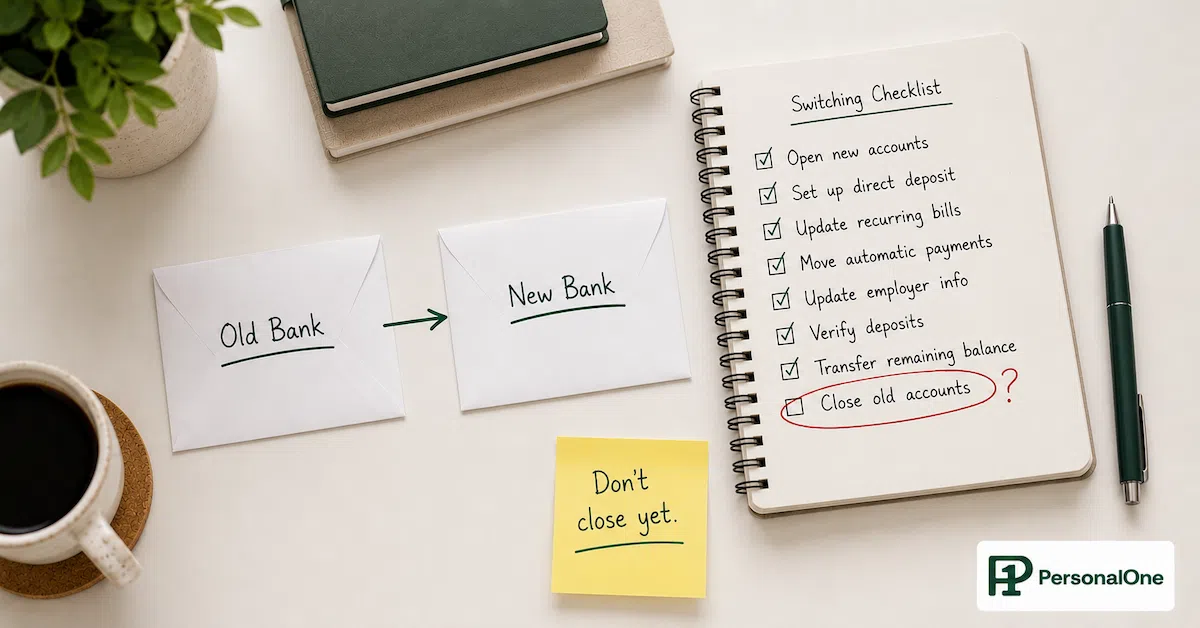
— The transition window is 30 to 45 days minimum. Both accounts must stay open and funded during this period. Closing the old account before every automated payment and every income source has been confirmed at the new account is the single most common switching mistake.
— Direct deposit changes can take one to two full pay cycles to process. The old account needs to remain funded for at least two paydays after you submit the change, not one.
— The most dangerous category is irregular recurring charges — annual subscriptions, semi-annual insurance payments, quarterly memberships. A 30-day statement scan misses them. You need 12 months of transaction history to catch everything.
— If you run a multi-account banking system, a bank switch is a full routing reconfiguration — not just a direct deposit update. Every automated transfer between accounts needs to be rebuilt at the new institution before the old transfers are cancelled.
Knowing how to switch banks is one of those things that looks simple until you are mid-transition and a bill bounces, a direct deposit goes to the account you just stopped funding, or an annual subscription charge hits a card linked to an account you thought was fully migrated. The generic checklist — open new account, update direct deposit, update autopay, wait 30 days, close old account — is not wrong. It is just incomplete in exactly the places where switches go wrong.
The reason bank switches feel stressful is not the paperwork. It is the invisible financial connections that a standard statement review does not surface — the payment that runs quarterly, the client who has sent ACH transfers to the same routing number for three years, the membership that charges annually in November and will not appear in a single month of transaction history. Finding all of them before closing the old account is the actual work of switching banks.
This article covers the complete switch process with specific attention to the failure modes every generic guide misses — the hidden recurring charges, the direct deposit timing gap, the multi-account routing reconfiguration, and the freelance payment landmine. For the broader question of which banking system fits how you actually use money, the full framework is in Online Banks vs Traditional Banks.
Before You Open the New Account: The Audit That Prevents Failures
Every failed bank switch can be traced to something that was not on the list going in. The audit that prevents failures happens before the new account is opened — not after. Once the transition begins, the clock is running. Finding a missed connection after the old account is closed means a bounced payment, a late fee, or an income deposit that goes nowhere.
The Pre-Switch Audit — Pull 12 Months of Transaction History
Download or print 12 full months of transaction history from every account that will be switching. Not 30 days. Not 90 days. Twelve months. This is the only timeframe that catches annual charges, semi-annual insurance payments, and quarterly subscriptions that will not appear in a shorter window.
Outgoing payments to find: Every recurring charge regardless of frequency. Monthly subscriptions, quarterly memberships, semi-annual insurance premiums, annual renewals, government payments, tax authorities, loan servicers, investment platforms, charitable giving, professional licensing fees. Every single debit that is not a one-time purchase.
Incoming deposits to find: Every income source, not just the primary employer. Side hustle payments, rental income, government benefits, pension deposits, investment dividends, peer-to-peer payments from recurring sources. If it arrives on a schedule, it needs to be on the list.
Hidden connections to find: Payment apps linked to the account (PayPal, Venmo, Cash App, Apple Pay, Google Pay). Budgeting apps that pull transaction data. Investment platforms connected for ACH transfers. Insurance companies with cards on file. Any merchant with a saved payment method that charges automatically.
The output of the audit is a master list: every outgoing recurring payment with its amount, frequency, and due date, and every incoming deposit source with its routing method and typical arrival date. This list is the switching project. Every item on it needs to be migrated before the old account can close.
The Switch Timeline: Why 30 Days Is the Minimum
The standard advice is to keep both accounts open for 30 days after the switch. That is the minimum for a simple financial setup with one income source and straightforward monthly autopay. For most people with a real-world mix of irregular charges, freelance income, and multi-account routing, 45 to 60 days is more realistic.
The Four-Phase Switch Timeline
Week 1 — Open and fund the new account. Open the new account. Make an initial deposit large enough to cover at minimum one month of all autopay obligations. Set up online access, mobile banking, and account alerts. Do not cancel anything from the old account yet. Both accounts are fully active and funded.
Week 2 — Update direct deposit and high-priority recurring payments. Submit the direct deposit change to every employer and income source. Update the most critical autopay items: rent or mortgage, utilities, loan payments, insurance. These have the most severe consequences if missed. Note the effective date for each change.
Weeks 3–4 — Update remaining autopay and verify incoming deposits. Work through the remainder of the master list. Confirm that the first direct deposit has arrived at the new account before reducing the old account balance. Update subscriptions, memberships, and payment apps. Keep the old account funded at a level that covers any autopay that has not yet confirmed at the new account.
Week 5–6 — Monitor and close. Verify two full pay cycles of direct deposit at the new account. Confirm every autopay item has processed at least once from the new account. Drain the old account to a minimal balance — enough to cover any straggler charge that might hit. After 45 to 60 days with no unexpected activity on the old account, close it formally and request written confirmation.
The Direct Deposit Gap: The Timing Mistake That Hits Most Switchers
The most consistent timing mistake in bank switches is underfunding the old account during the direct deposit transition period. Here is what actually happens: you submit a direct deposit change on Monday. Your employer's payroll department processes it. The change takes effect one to two full pay cycles later — meaning the next one or two paychecks still go to the old account while you believe the switch is complete.
If the old account has been drained in anticipation of the switch, those incoming deposits have nowhere adequate to land. Worse, any autopay that is still running from the old account during this period will be pulling from a balance you thought was done. The result is an overdraft on an account you were trying to leave.
The fix: Never reduce the old account balance below the equivalent of one full month of autopay obligations until you have personally seen two consecutive paychecks arrive at the new account. Not one. Two. Confirm the deposit on the new account app before making any assumption about the old account status.
For government benefits and Social Security: These changes take longer than employer direct deposit — sometimes three to four payment cycles. Start the update process before any other switching steps and plan accordingly. The Social Security Administration and other benefit providers have specific update procedures that differ from employer payroll forms.
The Hidden Recurring Charges That Break Switches
The items that break bank switches are almost never the obvious ones — rent, utilities, car payments. Those are on every checklist and get updated first. The items that break switches are the ones that charge infrequently enough to be invisible in a standard review.
The High-Risk Hidden Charge Categories
Annual subscriptions: Software, professional tools, cloud storage, domain renewals, Amazon Prime, Costco membership, professional organization dues. These charge once per year. A 30-day or even 90-day statement scan misses them entirely. Only a 12-month history surfaces them all.
Semi-annual insurance premiums: Auto insurance and some homeowners or renters policies offer a discount for paying six months at a time. The charge appears twice per year. Easy to miss in a partial statement review. The missed payment does not just produce a late fee — it can trigger a policy lapse.
Quarterly charges: Gym memberships that switched from monthly to quarterly billing, professional licensing fees, some streaming services, estimated tax payments for self-employed earners. Three months between charges means they are not visible in a single month of history.
Cards saved with merchants: Amazon, grocery delivery services, recurring online orders, subscription boxes. These charge a card on file, not directly from the bank account — but if the card is linked to the old account, the charge flows through there. Update the card details at every merchant independently from updating the bank account.
Dormant accounts with autopay: A credit card you rarely use that has a small recurring charge keeping it active. A streaming service on an old device you stopped using. A subscription from a free trial that converted to paid. These exist in the old account's transaction history but require a full-year scan to find.
From the Data
Across clients who completed bank switches using a full 12-month transaction audit, the most commonly missed charge category was annual subscriptions — appearing in roughly 80% of audits, with an average of two to three annual charges per account that a 30-day statement review would not have surfaced. The average total of missed annual charges was $340 per client, appearing as a single unexpected hit months after the switch was considered complete. The second most common category was semi-annual insurance premiums. Neither appears in a standard 30-day or 90-day review. The 12-month audit is not a best practice. It is the only timeframe that finds them.
Switching Banks When You Run a Multi-Account System
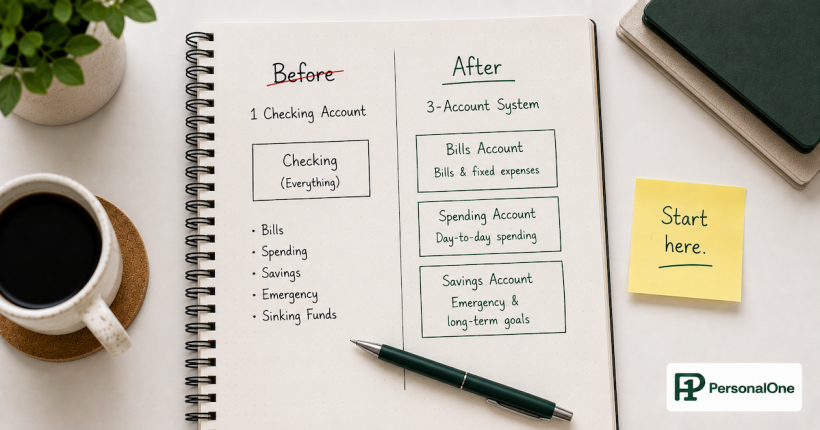
If your banking system includes a Bills Account, Spending Account, and Savings Account at the same institution, a bank switch is not just an autopay update. It is a full routing reconfiguration. Every automated transfer between accounts — the payday transfer from main checking to bills, the savings transfer, any scheduled internal moves — needs to be rebuilt at the new institution before the old transfers are cancelled.
The failure mode here is cancelling the old internal transfers before the new ones are verified as active. If the old bills account is closed but the new bills account has not yet received its first scheduled transfer from the new checking account, the autopay that runs from the new bills account will overdraft it immediately.
Multi-Account Switch Protocol
Step 1: Map every internal transfer in the current system. Source account, destination account, amount, frequency, and trigger date for each one.
Step 2: Open all new accounts at the new institution before switching any transfers.
Step 3: Rebuild every internal transfer at the new institution. Set them all up and verify each one is scheduled correctly before proceeding.
Step 4: Let the new transfer system run for one full cycle. Verify every transfer fired correctly and every account received the right amount.
Step 5: Only after Step 4 is confirmed, cancel the old internal transfers and begin winding down the old accounts. Never cancel the old transfers first.
The Freelance Payment Landmine
For freelancers, contractors, and anyone who receives income from clients rather than a single employer, the bank switch has one additional high-risk category that salaried employees do not face: client payment routing.
Clients who pay by ACH transfer have your bank account and routing number saved in their payment system. When you switch banks, those clients still have the old details. Unless you proactively notify every single client with updated payment information, their next invoice payment will go to the old account — or bounce entirely if the old account has been closed.
This is not a one-time notification. Clients who pay quarterly or on project completion may not send the next payment for weeks or months after you switch. The standard 30 to 45-day switch window is not long enough to catch a client who pays every 90 days. You need to update payment details with every active client regardless of when their next payment is expected, and follow up with any client who has not confirmed the update before closing the old account.
Payment platforms: Stripe, PayPal, Venmo, Wave, Gusto, and any other platform that holds your bank details and processes payments on your behalf all need to be updated independently. A Stripe payout going to a closed bank account creates a failed transfer that bounces back to Stripe — which then holds the funds while you sort out the error. Update every platform before the old account closes, not after a failed payout forces the issue.
Closing the Old Account: The Last Steps Most People Rush
The old account should not be closed until three conditions are met: all direct deposits have confirmed arrival at the new account for two consecutive cycles, all autopay items have processed at least once from the new account, and the 12-month transaction audit has confirmed no annual or irregular charges are pending within the next 60 days.
When those three conditions are met, close the account formally rather than just letting it go dormant. A dormant account can still receive charges — and some banks charge inactivity fees on accounts that drop below a minimum balance. Request written confirmation of closure from the bank. Download and save the final statement before closing for records purposes.
If the account has a positive balance at closure, request a cashier's check or ACH transfer to the new account. Do not leave it to the bank to handle automatically — confirm the destination and the timing explicitly.
Switching Banks Is the Easy Part. Choosing the Right One Is the Decision.
The complete framework for choosing between online banks, traditional banks, credit unions, and hybrid setups based on how you actually use money — fee structures, APY mechanics, digital workflows, and branch tradeoffs — is in Online Banks vs Traditional Banks.
Frequently Asked Questions
Will switching banks affect my credit score?
No. Checking and savings accounts are not reported to the credit bureaus. Opening or closing a bank account has zero impact on your credit score. The only credit-related concern is if you have a credit card with the bank you are leaving — closing that card can affect your credit utilization ratio and account age. If you are leaving a bank that also holds a credit card you use, keep the card open even if you move the checking and savings accounts elsewhere.
How long does a direct deposit change actually take?
Most employer payroll systems require one to two full pay cycles to process a direct deposit change. Some large employers with automated payroll systems can process changes faster — within one cycle. Government benefit agencies (Social Security, veterans benefits, state unemployment) typically take three to four payment cycles. Never assume a direct deposit change has taken effect until you see the deposit confirmed in the new account. Keep the old account funded for at least two full pay cycles after submitting any direct deposit change.
What if a payment goes to the closed account after I switch?
If the account is truly closed, most banks return the payment to the sender within one to five business days. Contact the sender immediately to notify them of the closure and provide the new account details for reissuance. If the account is simply empty rather than formally closed, the payment may overdraft the account or be returned depending on the bank's overdraft policies. This is why formal account closure — confirmed in writing — is important. A dormant but open account creates ongoing liability. A formally closed account returns misdirected payments cleanly.
Should I switch banks all at once or gradually move accounts over time?
Gradually is better for most people. Move the primary checking account first. Once it is running smoothly with all direct deposits confirmed and primary autopay migrated, move the savings account. If you run a multi-account system, migrate each account in sequence rather than simultaneously. Trying to switch a three-account system all at once multiplies the complexity and the points of failure. The gradual approach also means the full switch takes longer — often two to three months for a complete migration — but the risk of a missed payment or failed transfer is significantly lower.
Is there a best time of month to start a bank switch?
Yes — immediately after a payday and at least 10 days before the next cluster of bill due dates. Starting right after payday gives you the longest possible window before major obligations are due at the old account, and lets you begin the direct deposit change request at maximum distance from the next paycheck. Avoid starting a bank switch in the week before a major bill cluster fires — rent, mortgage, insurance, loan payments — because the transition window is too compressed to migrate those items safely before they charge.
Official Sources
CFPB — Bank Account Consumer Tools and Rights
FDIC — Deposit Insurance Coverage and Verification
Social Security Administration — Update Direct Deposit Information
More From This Cluster
Return to Online Banks vs Traditional Banks for the complete framework on choosing the right banking system for how you actually use money. For the complete banking architecture, see Banking Systems.
PersonalOne Money System
This content is researched, written, and owned by PersonalOne — a free financial education platform built to help Millennials and Gen Z build real financial systems.
Disclaimer: This content is for educational purposes only and does not constitute financial advice. Banking procedures, direct deposit timelines, and account closure policies vary by institution. Always verify specific terms and processes directly with your bank before initiating a switch. PersonalOne is not a licensed financial advisor.