Updated: September 13, 2026
Home › FinTech & Modern Money Tools › Budgeting Apps & Financial Automation › How to Set Up Monarch Money in 30 Minutes
What You Need to Know
— Setting up Monarch Money correctly in the first session determines whether the app becomes useful immediately or requires weeks of correction
— Account connection, category customization, and budget creation are the three steps that matter most — done in that order
— Most people make one critical mistake: skipping category customization and letting default categories misrepresent their actual spending
— Monarch Money is an affiliate partner of PersonalOne — we recommend it because it is the best aggregation-first budgeting tool available, not because of the partnership
— After initial setup, the system requires approximately 10 minutes per week to review — no daily management needed
Before you begin: This guide is for readers who have already created a Monarch Money account. If you have not signed up yet, start with our Monarch Money Review to see whether the app fits your needs, then use the PersonalOne affiliate link there to begin your trial.
```Why Setup Matters More Than the App Itself
Setting up Monarch Money correctly in your first session is the single most important factor in whether the app works for you long-term. A poorly configured Monarch account miscategorizes transactions, generates irrelevant alerts, and fails to reflect your actual financial picture — leading most people to abandon it within two to three weeks. A well-configured account starts delivering accurate insights from day one and requires minimal ongoing maintenance. The setup process takes 30 minutes done correctly. Redoing it after weeks of wrong categorization takes considerably longer.
This guide covers the exact sequence for setting up Monarch Money to function as a genuine financial dashboard from the first day you use it. The full context for where Monarch Money fits within a complete financial tool stack is covered in the guide to the best budgeting apps and financial automation tools.
Before You Start: What You Need
Gather login credentials for every financial account you plan to connect before opening Monarch Money. Interrupting setup to locate usernames and passwords for individual accounts breaks the session flow and leads to incomplete connections. The accounts worth connecting: all checking accounts, all savings accounts (including high-yield savings at neobanks), all credit cards, any investment or brokerage accounts, retirement accounts (401k, IRA), and any outstanding loans or student debt. Mortgage accounts can be connected but are optional at initial setup.
You will also need a clear sense of your main spending categories before customizing. The most useful preparation is a rough mental list of how you actually spend money — not how you think you should. If you spend on subscriptions, rideshare, food delivery, and gym memberships, those should be categories. If you do not own a car, auto expenses as a category is irrelevant. The default categories Monarch generates are generic; your customized categories are what make the app useful.
Step 1: Create Your Account (Minutes 0–5)
Go to monarchmoney.com and create an account. Monarch Money costs $14.99/month or $99.99/year (approximately $8.33/month). The annual plan is the better value if you commit to using it consistently — which the setup process in this guide is designed to ensure. A 7-day free trial is available.
During account creation you will be asked for basic household information — whether you are budgeting solo or with a partner, approximate income range, and primary financial goals. Answer these accurately. Monarch uses this information to configure initial category suggestions and budget starting points. Inaccurate responses produce a worse starting configuration that requires more correction time later.
Step 2: Connect All Accounts (Minutes 5–15)
Account connection is the most technically involved step and the one most people rush through incompletely. Monarch Money connects to financial institutions primarily through Plaid, which covers the majority of U.S. banks, credit unions, neobanks, and investment platforms. Some institutions connect directly through Monarch’s own integrations.
Navigate to Accounts in the left sidebar and select Add Account. Search for each institution by name. Most connections complete in under a minute: you enter your banking username and password (which Plaid handles with read-only access and does not store in Monarch directly), and the connection authenticates. Some institutions require two-factor authentication — have your phone nearby for verification codes.
Connect accounts in this order for the most complete initial picture: primary checking first, then savings accounts, then all credit cards, then investment accounts, then loans. If an institution does not appear in Plaid’s search, Monarch allows manual account entry where you input balances directly — this works for accounts at smaller institutions or credit unions not yet in Plaid’s network.
Step 3: Customize Your Categories (Minutes 15–22)
This is the step most people skip, and it is the primary reason Monarch Money fails to deliver useful insights for many users. Default categories are generic and will not accurately reflect how you actually spend money. Spending 7 minutes on category customization produces dramatically better transaction categorization going forward.
Navigate to Settings → Categories. Review the default list. Delete categories that do not apply to your life — if you do not have children, remove childcare. If you do not own a vehicle, remove auto-related categories. If you use food delivery apps as a separate budget from groceries, split them into distinct categories. Add categories that match your real spending: streaming subscriptions, gym membership, personal care, side hustle income if applicable.
After customizing categories, review the transactions Monarch has already pulled from connected accounts. Navigate to Transactions and sort by newest. Monarch will have auto-categorized recent transactions — scan for obvious miscategorizations and correct them. Correcting a transaction’s category also trains Monarch’s categorization model: the next time a transaction from that merchant appears, it will apply the corrected category automatically.
Step 4: Set Your Budget (Minutes 22–28)
Navigate to Budget in the left sidebar. Monarch will have generated a starting budget based on your income input and recent spending history. Review each category against your actual targets. The goal at initial setup is not a perfect budget — it is a realistic starting budget that reflects how you actually spend rather than how you intend to spend.
Set income first. Enter your expected monthly take-home pay. If your income is irregular, enter a conservative estimate — you can adjust this monthly as actuals come in. Setting income accurately is what makes the cash flow projection feature useful.
Set spending category limits based on your last two to three months of actual spending rather than aspirational targets. A budget built around what you actually spend, then gradually adjusted toward targets, produces better outcomes than a budget that immediately requires behavior changes you have not yet made. Monarch will flag when you approach or exceed category limits in real time.
Step 5: Set Up Goals (Minutes 28–30)
Navigate to Goals and create at least one financial goal during initial setup. Emergency fund, vacation savings, debt payoff, and home down payment are the most common. Setting a goal connects Monarch’s tracking to a specific target, which activates the progress tracking and projected completion date features.
For each goal, enter the target amount, the target date, and link the savings account where the money for that goal will accumulate. Monarch will calculate the monthly savings rate required to hit the target and compare it against your current savings rate, flagging if you are on or off track.
After Setup: The 10-Minute Weekly Review
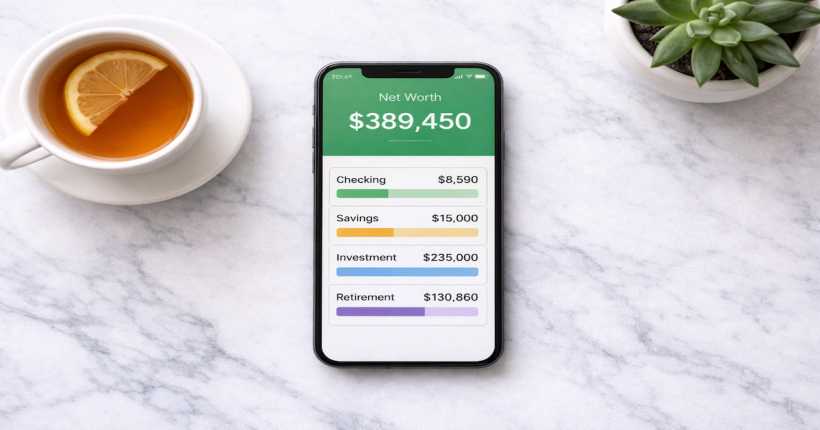
Once configured correctly, Monarch Money requires approximately 10 minutes per week to maintain. The weekly review sequence: open Transactions and scan for miscategorized items (correct any you find), open Budget and check category spending against limits, open Net Worth and note the current figure. That is the complete review. Everything else — categorization, tracking, alerts — happens automatically between reviews.
The most common mistake after initial setup is trying to interact with Monarch too frequently. Checking the app daily without a specific review purpose creates anxiety about normal spending fluctuations without producing useful action. The weekly review cadence is what makes the system sustainable long-term.
Monarch Money works best inside a complete budgeting system.
The full framework for connecting budgeting apps, account automation, and financial dashboards into a system that runs itself is in the Budgeting Apps & Financial Automation guide.
Explore Budgeting Apps & Financial Automation →Resources
Official Sources
CFPB — Bank Accounts and Services — Consumer rights guidance applicable to third-party financial apps that connect to bank accounts, including data access and dispute rights.
FDIC — Mobile Banking Safety — FDIC guidance on using mobile financial tools safely, including how to verify that accounts connected to budgeting apps remain FDIC-insured.
Continue Building Your System
The complete framework for budgeting apps, account aggregation, and financial automation — including how Monarch Money fits into a broader financial system — lives in the FinTech & Modern Money Tools guide.
Frequently Asked Questions
Is Monarch Money safe to connect to my bank accounts?
Yes. Monarch connects through Plaid, which uses read-only access — it can view transactions and balances but cannot initiate transfers or move money. Plaid uses bank-level 256-bit encryption and is used by the majority of major financial apps in the U.S. If you are uncomfortable with third-party data access, Monarch also supports fully manual account entry.
What if my bank is not in Monarch’s connection list?
Monarch supports manual account entry for institutions not available through Plaid. You enter your balance directly, and Monarch includes it in your net worth and dashboard. The limitation is that transactions do not sync automatically — you would need to update the balance manually when it changes. This is a reasonable workaround for smaller credit unions or institutions not yet in Plaid’s network.
How long does it take for historical transactions to populate?
Most connected accounts pull 3–12 months of transaction history on initial connection, depending on the institution. Some banks limit historical data exports through Plaid to 90 days. The transaction history populates within minutes of account connection for most institutions.
Should I connect my investment accounts?
Yes. Connecting investment accounts is what makes Monarch’s net worth tracking genuinely useful. Without investment account connections, net worth reflects only banking balances and debt — an incomplete and often discouraging picture. With investment accounts connected, net worth reflects total assets including portfolio value, which provides both accurate tracking and a more motivating picture of financial progress.
Disclaimer: This article is for informational and educational purposes only. PersonalOne is an affiliate partner with Monarch Money and may receive compensation for qualifying referrals at no additional cost to you. This does not affect editorial recommendations. App features, pricing, and availability are subject to change — verify current terms directly with Monarch Money before subscribing.