June, 2026
Home › Banking Systems › Bills System That Never Overdrafts › How to Calculate Your True Monthly Bills
What You Need to Know
— Most people underestimate their true monthly bills by 15–25% because they only count the bills that appear every month. Annual subscriptions, semi-annual insurance premiums, quarterly memberships, and variable utilities are invisible in a single-month review and account for most of the unexpected charges that overdraft a Bills Account.
— The correct method requires 12 months of transaction history — not one month, not three. Only a full year surfaces every annual and quarterly charge that will eventually hit your Bills Account.
— Every irregular bill gets converted to a monthly equivalent by dividing the annual total by 12. Car registration due in October costs $180 — that is $15 per month. Annual software renewal for $240 — that is $20 per month. These numbers add up to the true monthly bill total.
— Variable bills (utilities, some insurance) require a 12-month average, not the most recent bill. Using the most recent bill underfunds the Bills Account in high-usage months.
— After calculating the true monthly total, add a 10% buffer. The buffer absorbs small rate increases, forgotten charges, and the inevitable irregular bill you missed in the initial audit. Without it, your Bills Account will run short.
The most common reason a Bills Account runs short is not that the transfer amount is wrong — it is that the calculation that produced the transfer amount was incomplete. Most people calculate their monthly bills by looking at what appeared last month: rent, utilities, phone, car payment, maybe a subscription or two. That number is accurate for last month. It is not accurate for every month, because bills do not all arrive monthly.
Knowing how to calculate your monthly bills correctly means accounting for every charge that will eventually hit your Bills Account regardless of whether it appears monthly — the annual software renewal, the semi-annual insurance premium, the quarterly gym billing cycle, the variable utility that doubles in January. When those charges are excluded from the calculation, the Bills Account is underfunded by a predictable and avoidable amount, and the first time an irregular charge hits, the account falls short.
This article covers the complete 12-month bills inventory process — how to find every charge, how to convert irregular bills to monthly equivalents, how to handle variable bills correctly, and how to calculate the exact number to fund your Bills Account from day one. The broader account architecture that the Bills Account sits within is in the Banking Systems hub.
Why a Single Month of Statements Is Not Enough
The instinct when calculating monthly bills is to pull last month's bank statement and add up everything that came out. This produces an accurate picture of last month. It produces a significantly inaccurate picture of the average month, because it misses every charge that is scheduled to arrive on a quarterly, semi-annual, or annual cycle.
Consider what a single month of statements does not show:
— The auto insurance premium paid every six months ($800 semi-annual = $133/month not in any single month's statements)
— The annual software subscription renewing in March ($240/year = $20/month invisible in any non-March statement)
— The car registration due in October ($180/year = $15/month that never appears in a regular monthly review)
— The quarterly gym billing cycle ($90/quarter = $30/month that only appears in three months per year)
— The utility bill that averaged $85/month in summer but hit $210 in January
Added together, the charges a single-month review misses can easily represent $200–$400 per month in real obligations that will hit the Bills Account at some point in the year. When the Bills Account transfer is set using only the single-month picture, every irregular charge becomes a shortfall event. The fix is a full 12-month inventory before setting the transfer amount.
Step 1 — Pull 12 Months of Transaction History
The bills inventory starts with 12 full months of transaction history from every account that currently pays bills — checking accounts, credit cards used for autopay, PayPal or similar accounts linked to recurring charges. Download or print all of it before starting. Do not rely on memory or a partial review.
Most banks and credit card issuers allow you to download 12 months of transactions as a CSV or PDF from the account management portal. Some require downloading in 90-day increments. Pull every statement needed to cover the full 12 months without gaps — a gap is where a missed annual charge hides.
For credit cards specifically: many recurring charges are billed to a credit card rather than directly to a checking account. If your card is paid in full monthly, the individual subscription charges appear on the credit card statement, not the checking account statement. You need both to catch everything. Pull the full 12-month transaction history from every card that has any recurring charge on it.
Step 2 — The 12-Month Bills Inventory
Work through all 12 months of transactions and identify every recurring charge regardless of frequency. The goal is a complete master list with four columns: bill name, amount, frequency, and monthly equivalent.
The Bill Categories to Scan For
Housing: Rent or mortgage payment, renter's or homeowner's insurance (check if monthly or semi-annual), HOA fees, property taxes if not escrowed.
Utilities: Electricity, gas, water, trash, internet. Note: these are variable — pull all 12 months and calculate the average, not last month's amount.
Insurance: Auto insurance (monthly or semi-annual), health insurance if paid personally, life insurance, dental and vision if separate. Semi-annual policies are the most commonly missed insurance charge.
Transportation: Car payment, registration (annual — divide by 12), parking permits (monthly or annual), public transit passes.
Debt minimums: Credit card minimum payments, student loan payments, personal loan payments. Use the minimum payment for Bills Account sizing — any accelerated payoff is a separate decision.
Subscriptions and memberships: Every streaming service, software subscription, gym membership, professional association, club membership, box subscription, cloud storage, and app subscription. Include the ones that charge quarterly or annually — these are the most commonly missed.
Phone and technology: Cell phone plan (check if it includes installment payments for a device), internet (already in utilities), any other tech service billed monthly or annually.
Irregular annual charges: Professional licensing renewals, domain and website hosting, tax preparation services, annual memberships not caught elsewhere, any charge that appeared once in the 12-month review.
Step 3 — Convert Every Irregular Bill to a Monthly Equivalent
Once every recurring charge is on the master list, convert each one to a monthly equivalent using a simple formula: annual cost divided by 12. This is the amount that needs to be included in the monthly Bills Account transfer, even if the actual charge does not arrive monthly.
Monthly Equivalent Conversion Formula
— Annual charge: Amount ÷ 12 = monthly equivalent
Example: $240 annual software renewal ÷ 12 = $20/month
— Semi-annual charge: Amount ÷ 6 = monthly equivalent
Example: $810 semi-annual auto insurance ÷ 6 = $135/month
— Quarterly charge: Amount ÷ 3 = monthly equivalent
Example: $90 quarterly gym billing ÷ 3 = $30/month
— Variable monthly charge: Sum of all 12 months ÷ 12 = monthly average
Example: 12 months of electricity bills totaling $1,440 ÷ 12 = $120/month average
— Variable annual charge: Use the highest year-over-year amount as the baseline, not the average. Car registration that was $165 last year and $180 the year before — use $180 as the monthly equivalent baseline ($15/month).
The monthly equivalent column is what gets summed to produce the true monthly bills total. Every charge — regardless of actual billing frequency — is represented as a monthly number. When these numbers are added together, the result is what the Bills Account needs to receive every month to cover every obligation over a 12-month cycle.
From the Data
Across clients who completed a 12-month bills inventory for the first time, the average gap between what they thought their monthly bills were and what the inventory actually showed was $218 per month. In almost every case the gap traced to the same categories: semi-annual auto insurance (missed by roughly two-thirds of clients), annual subscriptions (missed by roughly 80%), and variable utilities averaged against the low-usage months rather than the full 12-month average. The clients who had experienced Bills Account shortfalls in the past almost always had a calculation gap in one of these three categories. The 12-month inventory resolved it in every case.
Step 4 — Handle Variable Bills Correctly
Variable bills — primarily utilities — require specific treatment in the bills calculation because their monthly amount changes significantly across the year. Using the most recent bill as the monthly estimate underfunds the Bills Account during high-usage months. Using the highest month overfunds it during low-usage months. The correct approach is a 12-month average.
How to calculate the variable utility average: Pull all 12 months of each utility bill. Add the total annual spend. Divide by 12. Use that average as the monthly equivalent in the bills total. The Bills Account will be slightly overfunded in low-usage months (building a small natural buffer) and appropriately funded in high-usage months.
Electricity example: January $195, February $182, March $145, April $98, May $85, June $110, July $165, August $188, September $142, October $108, November $130, December $172. Annual total: $1,720. Monthly average: $143. Use $143 as the monthly equivalent — not $85 (the recent summer low) and not $195 (the January peak).
For bills in their first year (new apartment, new plan): Use the provider's estimate for your area and property type, or the national average for your region. Add a 15% buffer to the estimate rather than the standard 10% to account for the uncertainty of a first-year baseline. Recalibrate after 12 months of actual bills.
Step 5 — Add the 10% Buffer
Once the true monthly total is calculated from the inventory, add 10% to it. This is not optional padding — it is structural protection against three predictable failure modes.
Rate increases: Insurance premiums, utility rates, and subscription prices all increase over time. A 3–5% annual increase in several bills simultaneously can push the actual monthly total above the calculated baseline within months of setting it.
Missed charges: Even a thorough 12-month inventory misses something. A charge that moved from one card to another, an autopay that started after the statement period, a service that billed twice in the same month — something will appear that was not in the calculation. The buffer absorbs it without requiring an immediate transfer adjustment.
New obligations: Bills change. A new subscription, a rate increase, a new insurance policy. The 10% buffer provides time to notice and adjust the transfer amount before the Bills Account runs short.
Complete Bills Account Calculation Example
— Rent: $1,450/month
— Renter's insurance: $180/year ÷ 12 = $15/month
— Electricity (12-month average): $143/month
— Internet: $65/month
— Cell phone: $55/month
— Auto insurance (semi-annual $810): $810 ÷ 6 = $135/month
— Car registration (annual $180): $180 ÷ 12 = $15/month
— Student loan minimum: $220/month
— Streaming services (3): $45/month
— Gym (quarterly $90): $90 ÷ 3 = $30/month
— Annual software subscription ($240): $240 ÷ 12 = $20/month
— Cloud storage ($36/year): $36 ÷ 12 = $3/month
True monthly total: $2,196
10% buffer: $220
Bills Account monthly transfer: $2,416
Step 6 — Set the Transfer and Schedule the Quarterly Review
Once the Bills Account monthly transfer amount is calculated, set it as a scheduled automatic transfer from the primary checking account on payday. For biweekly pay schedules, split the amount in half and transfer each payday. For monthly pay, transfer the full amount at the start of the month. The transfer fires automatically — no manual action required each cycle.
Then set a quarterly calendar reminder to audit the Bills Account for three things: new charges that appeared since the last calculation, rate increases on existing bills, and bills that were cancelled and should be removed from the calculation. The quarterly review takes 20–30 minutes and keeps the transfer amount accurate without requiring constant manual oversight.
The first quarterly review after setting up the Bills Account almost always surfaces at least one charge that was missed in the initial inventory. That is normal — the 10% buffer covers it. The second quarterly review typically produces a much cleaner picture. By the fourth review (12 months in), the Bills Account calculation is highly accurate and the transfer amount rarely needs adjustment except for specific known changes.
The Right Number Makes the System Work From Day One.
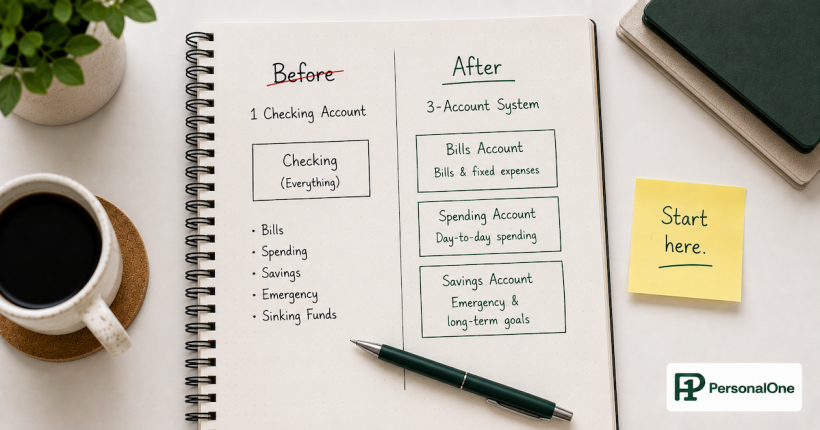
Calculating your true monthly bills is the foundation of a Bills Account that never overdrafts. The complete system — how the Bills Account connects to the spending account, the savings account, and the automated transfer structure that runs everything — is in the Bills System That Never Overdrafts guide.
Frequently Asked Questions
What if I do not have 12 months of statements at my current bank?
Pull as many months as are available from your current bank, then supplement with credit card statements for the same period. If you changed banks during the year, pull statements from both institutions to cover the full 12 months. For any charge you know exists but cannot find in available statements — a semi-annual insurance premium that is not yet due, an annual subscription you know renews in a future month — add it manually to the inventory with the correct annual amount divided by 12. Estimate rather than omit. An estimated monthly equivalent is always better than a zero.
Should I include irregular expenses I want to eliminate?
Yes — include everything that is currently active until it is cancelled. A subscription you intend to cancel is still a bill until the cancellation is confirmed. A membership you are thinking about ending is still a bill until it is ended. The Bills Account calculation should reflect current reality, not intentions. Cancel first, then recalculate. Including a bill you later cancel produces a modest overfunding of the Bills Account that builds a small additional buffer — which is better than underfunding by excluding a bill that turns out not to be cancelled.
My utility bills vary significantly — sometimes double in winter. How do I handle this?
Use the 12-month average as the base and verify that the 10% buffer covers the peak month variance. In the electricity example above, the January peak was $195 and the 12-month average was $143 — a $52 difference. The 10% buffer on a $2,196 total is $220, which comfortably covers that variance. If the peak month significantly exceeds the average plus buffer, either increase the buffer to 15% or calculate the average on the top six months rather than all 12 to capture a higher baseline.
What if a bill changes significantly after I set the transfer amount?
Update the Bills Account transfer immediately when you discover the change — do not wait for the next quarterly review. If rent increases from $1,450 to $1,600, recalculate the monthly total with the new rent figure, add the 10% buffer, and update the scheduled transfer. Most banks allow you to edit recurring transfer amounts without cancelling and resetting the schedule. The quarterly review catches gradual changes. Large known changes should be addressed immediately when they occur.
Should credit card minimum payments be included in the Bills Account calculation?
Yes — the minimum payment amount belongs in the Bills Account calculation as a fixed obligation. If you pay more than the minimum, the amount above the minimum is a financial goal decision, not a fixed bill. The Bills Account covers the minimum. Accelerated payoff amounts can be treated as a transfer to a debt payoff account or routed directly from the spending account surplus. Keeping the minimum in the Bills Account and the accelerated payoff separate gives you accurate visibility into both your fixed obligation floor and your discretionary debt acceleration.
Official Sources
Bureau of Labor Statistics — Consumer Price Index (track utility and insurance rate trends)
CFPB — Bank Account Consumer Tools and Rights
FDIC — Consumer Financial Education Resources
More From This Cluster
Return to Bills System That Never Overdrafts for the complete framework — how the Bills Account connects to the spending account and savings layer, and how the automated transfer structure makes bill payment completely automatic. For the complete banking architecture, see Banking Systems.
PersonalOne Money System
This content is researched, written, and owned by PersonalOne — a free financial education platform built to help Millennials and Gen Z build real financial systems.
Disclaimer: This content is for educational purposes only and does not constitute financial advice. Bill amounts, utility rates, and insurance premiums vary significantly by location, provider, and individual circumstances. The calculation examples in this article are illustrative. Always use your own 12-month transaction history to calculate your actual monthly bills total. PersonalOne is not a licensed financial advisor.