July, 2026
Home › Financial Automation › Budget Automation Systems › How to Track Every Dollar Without Manual Entry
TL;DR
— Tracking spending without manual entry requires connecting all accounts to a single aggregation layer — bank accounts, credit cards, and loan accounts — so transactions populate automatically rather than requiring input.
— The configuration work happens once during setup: connecting accounts, mapping categories, setting rules for recurring transactions. After setup, the system updates in real time without ongoing manual effort.
— Category mapping is the most important setup decision — correctly configured spending categories produce useful data automatically. Poorly mapped categories produce noise that requires manual correction every month.
— The goal of automated tracking is not perfect categorization of every transaction — it is a clear picture of spending patterns across the categories that matter most for financial decisions.
— A complete automated financial picture requires four connected layers: spending tracking, account balances, savings progress, and net worth — all updating without manual input.
The ability to track spending without manual entry is what separates a financial system that runs in the background from one that demands daily attention. Manual tracking — entering transactions by hand, updating spreadsheets, categorizing purchases individually — works in theory and collapses in practice the moment life gets busy. The system that requires the most effort during the most stressful financial periods is the system most likely to be abandoned exactly when it is most needed.
Automated spending tracking eliminates the manual entry requirement entirely. Connected accounts feed transaction data into a central system automatically. Category rules apply without human review. Spending totals update in real time. The financial picture is always current without the daily effort that makes manual tracking unsustainable. This article covers the exact setup sequence — account connections, category configuration, automation rules, and the four-layer financial picture that produces genuinely useful data rather than just a running list of transactions.
This is a core component of the budget automation systems framework — the tracking layer that gives every other automation element accurate data to work from.
Why Manual Tracking Fails and What Automated Tracking Does Differently
Manual spending tracking has three structural failure points that automated tracking eliminates by design.
Failure point 1 — Delayed entry. Manual tracking requires entering transactions after the fact. Most people do not enter transactions immediately after purchase. They accumulate them in memory, on receipts, or in a mental note to catch up later. When catch-up happens — if it happens — the categorization is approximate rather than accurate. A transaction from 11 days ago categorized from memory produces a different record than a transaction automatically tagged at the moment it posts.
Failure point 2 — Inconsistent categorization. Manual categorization of the same type of transaction produces different categories depending on who is doing it, when they are doing it, and how they are thinking about it that day. A restaurant purchase becomes dining out on Monday and food on Friday. Inconsistent categories produce spending data that cannot be compared month to month. Automated category rules apply the same logic every time to every transaction without variation.
Failure point 3 — Maintenance burden under stress. The periods when accurate spending tracking is most valuable — when finances are tight, when an unexpected expense hits, when income is disrupted — are exactly the periods when the mental bandwidth required for manual entry is least available. An automated system that updates without human input produces accurate data precisely when it matters most, regardless of what else is happening.
Step 1 — Connect All Accounts to a Single Aggregation Layer
Automated spending tracking begins with a single aggregation point — one tool or platform that connects to every financial account and pulls transaction data automatically. Without this central layer, spending data is fragmented across individual bank apps, credit card portals, and loan servicer websites. Each shows its own transactions clearly but none shows the complete picture. The central aggregator is what produces a unified view.
The accounts that need to be connected for a complete spending picture are checking accounts (all of them — primary, lifestyle, and essentials if using a multi-account structure), credit cards (every card used for any purchase regardless of frequency), and any accounts used for recurring automatic payments. Savings accounts and investment accounts can be connected for net worth tracking but do not need to be part of the spending tracking layer unless transfers between them need to be categorized.
Most modern budgeting apps connect to financial institutions through Plaid or a similar data aggregation service. The connection process requires entering bank credentials or authorizing read-only access. This is a read-only connection — the aggregator can see transactions but cannot initiate transfers or make changes to the account. Once connected, transactions typically populate within 24 hours and update automatically on a daily basis or in real time depending on the institution and the aggregation service.
The practical implication of connecting all accounts simultaneously is that the first view of aggregated data is often the most clarifying financial picture most people have ever seen. Transactions from multiple cards and accounts that were previously tracked separately — or not tracked at all — appear together in a single chronological feed. Most people discover spending patterns they were not aware of within the first week of seeing this unified view.
Step 2 — Configure Category Mapping That Produces Useful Data
Category mapping is where most automated tracking setups produce either useful financial data or useless noise. The default categories that aggregation tools apply automatically are based on merchant classification codes — broad labels like "Food & Drink" or "Shopping" that group transactions by the type of merchant rather than the type of spending decision. These default categories are a starting point, not a finished system.
The category structure that produces actionable data maps to the spending decisions that matter for the budget. For most households those categories are: groceries (food purchased for home preparation), dining out (all food and beverage purchased outside the home including coffee shops and delivery), transportation (gas, public transit, rideshare, parking), utilities, housing (rent or mortgage, renters insurance, any home-related recurring cost), subscriptions (all recurring digital services), personal care, entertainment, clothing, and a miscellaneous category for everything else.
Setting up merchant-level rules is what makes automated categorization accurate over time. When a specific merchant — a particular grocery store, a gas station chain, a streaming service — is mapped to a specific category once, every future transaction from that merchant populates the correct category automatically. A household with 30 to 40 regular merchants configured as category rules will see 80 to 90 percent of all transactions automatically and correctly categorized without any manual review.
The remaining 10 to 20 percent — new merchants, one-time purchases, ambiguous transactions — require manual categorization when they appear. Reviewing and categorizing these takes five to ten minutes per month for most households. This is the only manual effort the automated tracking system requires after initial setup is complete.
Step 3 — Build Automation Rules for Recurring Transactions
Beyond merchant-level category rules, most aggregation tools support additional automation rules that reduce the manual review requirement further. Three types of rules are worth configuring during initial setup.
Split rules for merchants that serve multiple purposes. A warehouse club like Costco or Sam's Club produces transactions that could include groceries, household supplies, clothing, electronics, or gasoline in a single purchase. A split rule can automatically divide the transaction amount across categories by percentage — 60 percent groceries, 30 percent household, 10 percent miscellaneous — based on typical purchase patterns at that merchant. This is less precise than itemized receipt tracking but more accurate than a single broad category assignment.
Exclude rules for transfers between own accounts. Transfers between a primary checking account and a savings account, or between an essentials account and a lifestyle account, are not spending — they are money movement. Without an exclude rule, these transfers appear as transactions and inflate spending totals in whatever category they get assigned to. Marking all internal transfers as excluded removes them from spending tracking while keeping them visible in the account balance view.
Flag rules for transactions above a threshold. Setting an automatic flag on any transaction above $150 to $200 creates a review queue for large purchases. This serves two functions: it surfaces unusual charges that might indicate fraud or an account error, and it provides a consistent prompt to categorize large one-time expenses correctly rather than letting them default to a broad miscellaneous bucket that obscures the data.
The Four-Layer Financial Picture
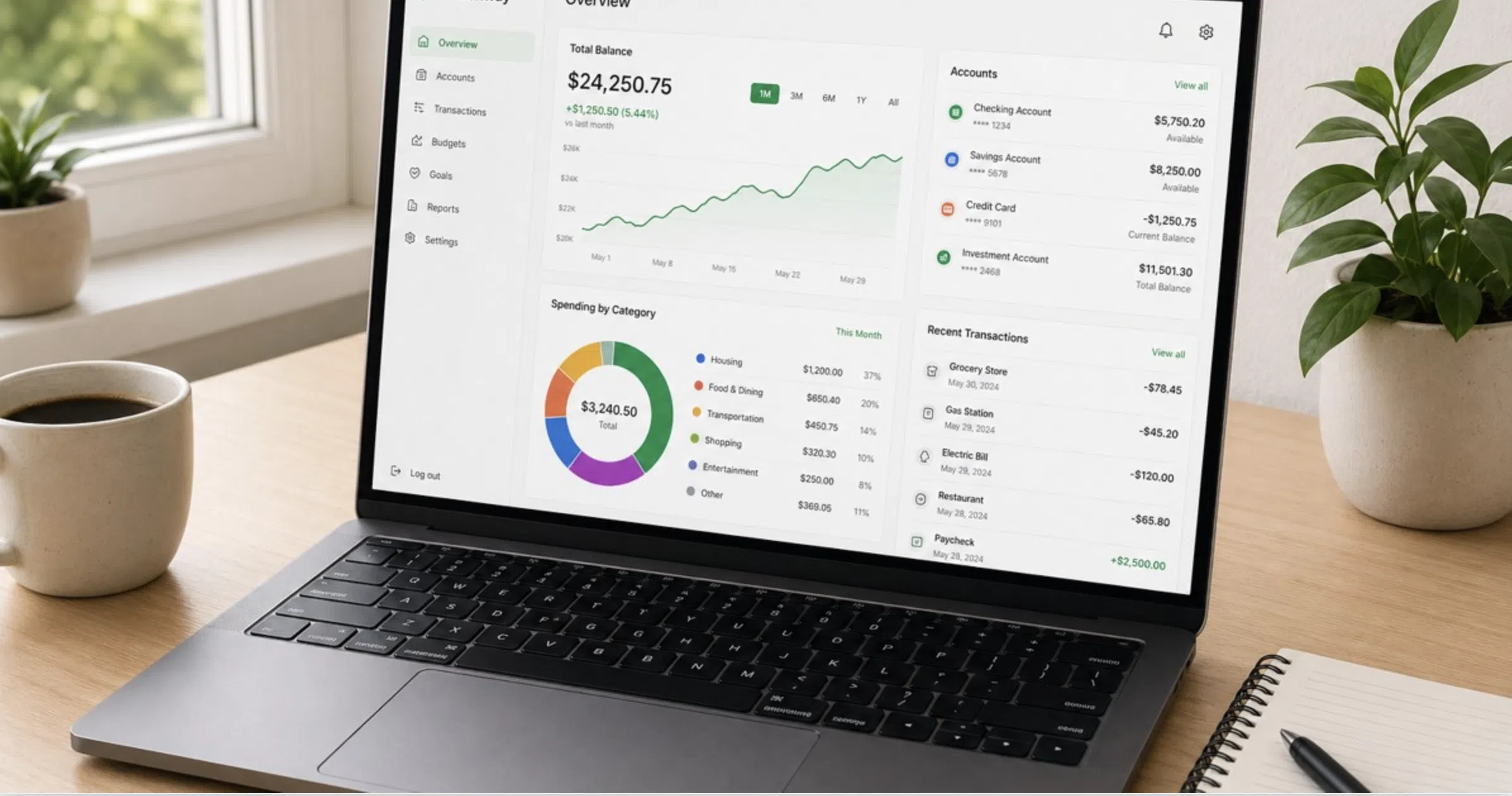
A complete automated financial picture is not just spending tracking. It is four connected data layers that together show where money came from, where it went, where it is now, and what the complete financial position looks like. Each layer updates automatically without manual input once the connections are configured.
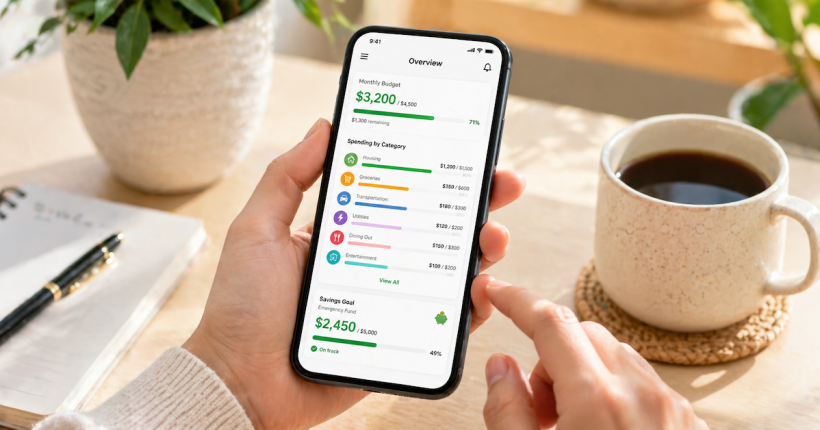
Layer 1 — Spending by category. The monthly spending total for each category against the budget allocation for that category. This is the data the category mapping and automation rules produce. The useful view is not the transaction list but the category summary — how much was spent in dining out versus the budget, how groceries compared to the allocation, where the month ended relative to the plan. This view answers the question: did spending match the budget?
Layer 2 — Account balances in real time. The current balance of every connected account updated as transactions post. This layer answers the question: where does the money actually sit right now? For a three-account budget structure, this view shows the essentials account balance relative to upcoming bill obligations, the lifestyle account balance relative to the remaining days in the spending period, and the savings account balance relative to the emergency fund target.
Layer 3 — Savings progress toward goals. The current balance of savings sub-accounts or labeled buckets against the target amount for each goal — emergency fund target, sinking fund targets, short-term savings goals. This layer answers the question: is the savings automation producing progress at the expected rate? A monthly contribution of $200 to an emergency fund should show a balance increasing by approximately $200 per month. If it is not, a transfer did not execute or a withdrawal occurred that needs to be identified.
Layer 4 — Net worth. Total assets minus total liabilities, updated automatically as account balances change and as connected loan balances decrease with monthly payments. This layer answers the question: is the overall financial position improving? Net worth growth over a 12-month period is the summary metric that confirms the complete system — spending structure, savings automation, debt payoff — is producing the intended result. The financial automation framework covers how connecting all four layers into a single dashboard produces the ongoing visibility that makes financial decisions faster and more accurate.
What to Do With the Data Once the System Is Running
Automated tracking produces data. The data only produces financial improvement when it is reviewed and acted on at the right cadence. The review structure that works alongside automated tracking is a weekly five-minute check and a monthly 20-minute review — not daily monitoring, which defeats the purpose of automation, and not quarterly reviews, which allow too much drift to accumulate between correction points.
The weekly five-minute check covers three things: lifestyle account balance relative to remaining spending days in the period, any flagged transactions needing categorization, and any alert that fired during the week. If the lifestyle account balance is on track, no flags require attention, and no alerts fired, the check is complete. The total time is under five minutes.
The monthly review covers spending by category against budget allocations, savings progress against targets, any category that consistently ran over its allocation for two or more consecutive months — which signals a budget target that needs adjustment rather than a spending behavior that needs correction — and one forward-looking item: any known upcoming irregular expense that needs a sinking fund contribution added or adjusted.
How to automate a monthly budget effectively — including how this tracking layer connects to the paycheck splitting, bill automation, and savings routing that make the full system run — is covered in detail in the how to automate a monthly budget in 10 minutes guide.
Tracking is the data layer. Automation is the system layer.
Automated spending tracking gives you accurate data without manual effort. The complete Budget Automation Systems framework connects that data to paycheck routing, savings automation, and bill scheduling into a single system that runs without daily management.
Explore Budget Automation Systems →Resources
CFPB — Budget Worksheet and Planning Tools
CFPB — Track Your Spending With This Easy Tool
FDIC — Money Smart Financial Education Program
Federal Reserve — Report on the Economic Well-Being of U.S. Households
Continue Learning About Financial Automation
This article covers the automated spending tracking setup. The complete framework for connecting tracking to paycheck automation, savings routing, and bill scheduling is in the Financial Automation authority hub.
Frequently Asked Questions
Is it safe to connect bank accounts to a budgeting app?
Reputable aggregation services use read-only access to account data — they can see transactions and balances but cannot initiate transfers, make payments, or change account settings. Look for apps that use SOC 2 certified aggregation services and 256-bit encryption for data transmission. The connection is similar in security profile to what your bank uses when you log in through its own website. If additional caution is preferred, some tools support manual account balance entry and CSV import from bank statements as an alternative to live connection.
How long does the initial setup take?
Connecting accounts takes 20 to 40 minutes depending on the number of institutions and whether any require multi-factor authentication during the connection process. Configuring category rules for regular merchants takes an additional 30 to 60 minutes and produces the majority of the ongoing automation benefit. The total first-time setup investment is one to two hours. After that, ongoing maintenance averages five to ten minutes per week for transaction review and flagged item categorization.
What do I do when a transaction is categorized incorrectly?
Reclassify it manually and then check whether a merchant rule exists for that merchant. If the merchant has no rule, create one so future transactions from the same merchant categorize correctly automatically. If a rule exists but produced the wrong category, update the rule. Most miscategorization issues resolve themselves within two to three months of regular rule maintenance as the system learns the household's specific merchant patterns.
How often should I check the automated tracking system?
A five-minute weekly check is sufficient under normal conditions — confirm no alerts fired, review any flagged transactions, and check the lifestyle account balance relative to remaining days in the spending period. A 20 to 30 minute monthly review covers category spending against budget allocations, savings progress, and any recurring miscategorizations that need rule updates. Daily checking defeats the purpose of automation and adds the exact cognitive load the system was designed to eliminate.
What if my bank does not connect to the aggregation service?
Most major banks and credit unions connect through Plaid or similar services. If a specific institution does not support live connection, most budgeting apps support manual account entry — you update the balance periodically rather than having it update automatically. For spending tracking specifically, most banks offer CSV or OFX export of transaction history that can be imported into a budgeting app manually on a weekly or monthly basis. This adds approximately 10 minutes per month of manual work but produces the same category tracking capability as an automated connection.
Does automated tracking work for cash spending?
Cash transactions do not appear automatically in connected account feeds because they draw from a bank account as a single ATM withdrawal rather than as individual purchases. The standard approach is to categorize the full ATM withdrawal as a single cash spending category, or to track cash purchases manually using a simple note app and enter them as a single transaction at the end of each week. For most households, cash represents a small enough percentage of total spending that precise tracking is less important than tracking the categories where the majority of spending occurs electronically.
Disclaimer: This article is for educational purposes only and does not constitute financial advice. App features, account connection capabilities, and data security practices vary by provider and are subject to change. Always verify current security practices and terms of service directly with any financial app before connecting account credentials. PersonalOne is not responsible for decisions made based on this content.