2026
Home › Financial Automation › Debt & Payment Automation › How to Set Up Student Loan Autopay the Right Way
Part of Debt & Payment Automation — building payment systems that protect due dates, automate required payments, and make extra debt payments work the way you intend.
2026 Federal Student Loan Auto Pay Deadline
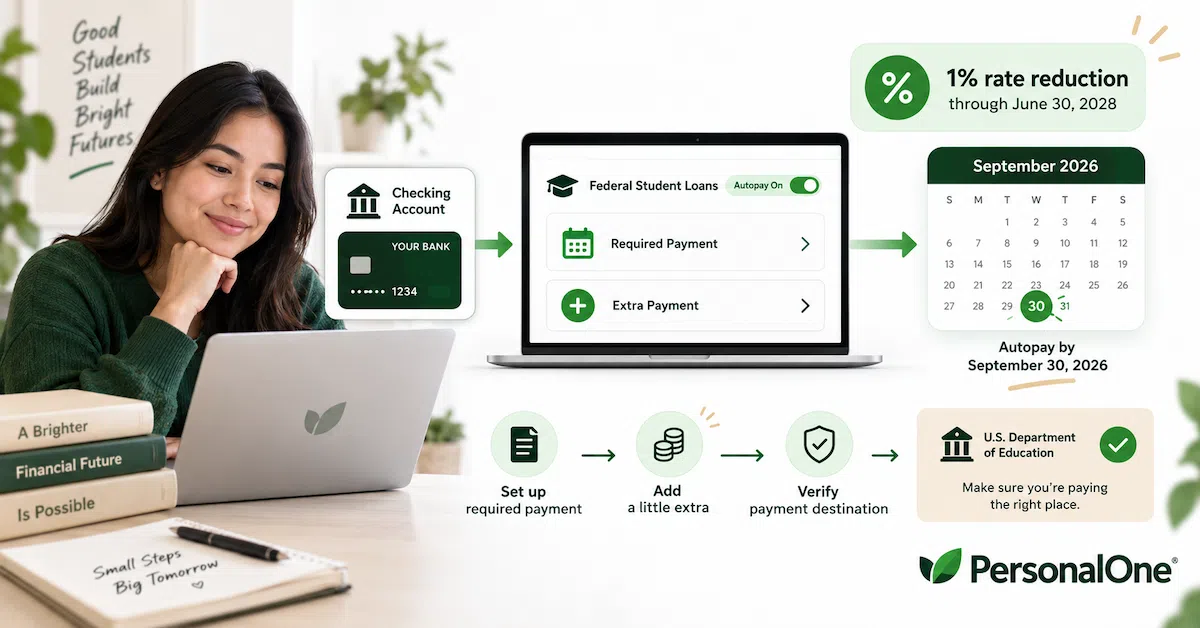
Eligible federal student loan borrowers who are already enrolled in auto pay or enroll by September 30, 2026 can receive a temporary 1% interest-rate reduction.
The temporary 1% reduction is scheduled to remain in effect through June 30, 2028. Check your federal loan servicer account to confirm your loans qualify and that auto pay is active.
What You Need to Know
— Student loan autopay should do more than prevent a forgotten payment. You should verify the withdrawal amount, interest-rate reduction, and payment destination.
— Eligible federal borrowers who enroll in auto pay by September 30, 2026 can receive the temporary 1% interest-rate reduction through June 30, 2028.
— If you pay extra, do not assume all of the extra amount automatically goes straight to principal or to the loan you want to attack.
— Federal student-loan payments are generally applied to outstanding interest before principal, and borrowers with multiple loans may need to review allocation instructions.
— After a servicer transfer, repayment-plan change, bank-account change, or payment change, verify the autopay system again instead of assuming the old setup still works.
Student loan autopay sounds simple: connect a bank account, let the servicer withdraw the monthly payment, and stop worrying about the due date.
But that is only the first layer.
If you have federal student loans, autopay may also affect your interest rate. If you make extra payments, the servicer has to decide how those payments are allocated across your loans. If your loan moves to a new servicer, parts of the payment system may need to be set up again.
That means the real goal is not simply to turn autopay on.
The goal is to build a student-loan payment system you can verify: required payment, rate benefit, extra-payment destination, and ongoing account status.
Why Student Loan Autopay Deserves More Attention in 2026
Federal student-loan auto pay has an unusually important deadline this year.
The U.S. Department of Education announced that eligible federal student loan borrowers enrolled in auto pay can receive a temporary 1% interest-rate reduction beginning July 1, 2026.
Borrowers who are already enrolled or who enroll by September 30, 2026 can receive that reduction through June 30, 2028.
That is larger than the traditional 0.25% auto-pay reduction many federal borrowers are familiar with.
Because the enrollment deadline is approaching, borrowers who have eligible federal loans should not wait until the end of September to discover that their bank information is incorrect, their servicer login does not work, or auto pay was never fully activated.
Student Loan Autopay Has Four Jobs
PersonalOne treats student loan autopay as a four-part system.
1. Required Payment
The scheduled monthly amount should be withdrawn from the correct bank account on time.
2. Interest-Rate Benefit
If your loans are eligible for an auto-pay rate reduction, verify that the benefit actually appears on the account.
3. Extra-Payment Direction
If you pay more than required, know which loan receives the overpayment and how it is applied.
4. Ongoing Verification
Check the system again after a servicer transfer, repayment-plan change, bank-account change, or major payment change.
If one of those four pieces fails, autopay may still appear to be “working” while the overall repayment system is not doing what you intended.
Step 1: Confirm Which Servicer Actually Handles Your Loans
Federal Student Aid owns or oversees federal student loans, but private servicing companies handle many of the day-to-day payment functions.
Before setting up auto pay, confirm the current servicer associated with your loans.
You can review your federal student-loan information through your StudentAid.gov account and then use the official servicer website associated with the loan.
This step matters because student loans can be transferred from one federal servicer to another. The company that handled your loan two years ago may not be the company handling it today.
Do not enter bank information through a link from an unsolicited email, text message, or company claiming it can enroll you in federal loan benefits for a fee. Federal loan servicing and federal repayment-plan assistance do not require a third-party enrollment fee.
Step 2: Review Your Required Payment Before Turning Autopay On
Automation should not replace understanding what will be withdrawn.
Before enrolling, confirm:
— your repayment plan
— the required monthly payment
— the payment due date
— the bank account that will fund the withdrawal
— whether the account normally has enough cash when the payment is scheduled
A perfectly automated withdrawal can still create a problem if it pulls from an account that does not have enough money.
If your bank-account structure is not yet stable enough to support recurring automatic withdrawals, review Banking Systems & Account Structure before increasing automation.
Step 3: Enroll Through Your Official Servicer Account
Federal borrowers generally enroll in auto pay through the online account maintained by their federal loan servicer.
The exact screen labels can vary by servicer, but the process generally involves selecting auto pay, entering or confirming bank information, reviewing the payment amount, and authorizing recurring withdrawals.
Do not stop after clicking the enrollment button.
Look for confirmation that auto pay is active.
Then watch the first scheduled withdrawal.
Enrollment submitted → Auto pay confirmed → First withdrawal verified
Until the first automatic payment successfully clears, continue paying attention to the due date. Do not assume an application or enrollment screen means the first payment is guaranteed to occur exactly as expected.
Step 4: Verify the 2026 Interest-Rate Reduction
Turning on auto pay is one action. Confirming the rate benefit is another.
Eligible federal borrowers enrolled by the September 30, 2026 deadline can receive the temporary 1% reduction through June 30, 2028.
After auto pay becomes active, review the loan information displayed by your servicer.
Look for the adjusted interest rate or other confirmation that the reduction has been applied.
If you believe your loan should qualify but you do not see the expected benefit, contact the servicer rather than assuming the account will correct itself later.
Deadline Check
Do not wait until September 30 to begin. Leave time to resolve login problems, incorrect bank information, account transfers, or enrollment issues before the deadline.
Can You Use Student Loan Autopay on an Income-Driven Repayment Plan?
Yes. Federal Student Aid says borrowers on an income-driven repayment plan can enroll in auto pay.
The amount withdrawn will follow the scheduled payment associated with the repayment plan.
But that creates another reason to review the system whenever the required payment changes.
If income recertification, a repayment-plan change, or another account update changes the required payment from $175 to $290, you need to know that before the larger withdrawal hits the bank account.
Automation should make repayment easier to execute. It should not make changes in the payment amount invisible.
Step 5: Separate the Required Payment From the Extra Payment
This is where PersonalOne's broader debt-automation system becomes useful.
The required monthly payment has one job:
Keep the repayment obligation current.
An extra payment has a different job:
Reduce the debt faster or direct more money toward a specific loan.
Required Payment Layer
Auto pay the scheduled federal student-loan payment.
Extra Payment Layer
Add a separate recurring or one-time overpayment only after deciding which loan should receive it.
For the broader system of separating required payments from an attack payment, see How to Automate Debt Payoff (coming soon).
Do Extra Student Loan Payments Go Straight to Principal?
Not necessarily.
This is why the phrase “principal-only payment” can be misleading when used as a universal instruction.
Federal student-loan payments are generally applied to outstanding interest first and then to principal.
Imagine one of your loans currently has:
Outstanding interest: $40
Extra payment: $200
Amount potentially remaining after interest: $160
The $200 should not automatically be described as a $200 principal-only payment.
The more accurate approach is: make the extra payment, understand the payment-application order, and verify how the remainder affects principal.
Step 6: Tell the Servicer Where You Want Extra Money to Go
If you have several federal student loans, one monthly bill may represent multiple underlying loans with different balances and interest rates.
Suppose you have:
| Loan | Balance | Interest Rate |
|---|---|---|
| Loan A | $8,500 | 6.5% |
| Loan B | $6,000 | 5.5% |
| Loan C | $4,000 | 4.5% |
If your strategy is to attack the highest-interest loan first, you may want an extra $150 directed toward Loan A.
Do not assume that simply sending $150 extra guarantees that the full overpayment will be allocated exactly that way.
Federal servicers may provide online options to specify how payments are allocated or to save payment instructions for future overpayments.
The principle is simple: if the destination matters, give the servicer a destination.
See It in Practice
Imagine Maya. She has three federal Direct Loans with rates of 6.5%, 5.5%, and 4.5%. Her required monthly payment is $320, and she enrolls in auto pay so that payment is handled automatically.
Maya also has another $150 per month available for debt payoff. Instead of simply increasing the withdrawal and assuming the extra money will go to the loan she cares about most, she checks her servicer's payment-allocation options.
Her strategy is to attack the 6.5% loan first, so she gives instructions directing the extra amount toward that loan. She then reviews the next account statement to confirm that the payment was applied as expected.
The $320 required payment protects the repayment plan. The extra $150 has a deliberate destination.
The lesson: Maya did not stop at “autopay is on.” She verified the required withdrawal, the interest-rate benefit, and the destination of the extra money.
What Does “Paid Ahead” Mean?
Extra student-loan payments can create another confusing situation: your account may show that you are paid ahead.
Depending on the servicer and your instructions, an overpayment may advance the due date because you effectively covered more than one scheduled payment.
That does not necessarily mean you should stop making monthly payments.
If your goal is accelerated payoff, continuing the normal monthly payment while also making extra payments can keep the debt moving downward faster.
Check your servicer's rules and saved payment instructions so you understand whether an extra payment changes the next amount due, advances the due date, or simply reduces the balance while regular auto pay continues.
Why We Are Not Building This Strategy Around Biweekly Autopay
You may see advice online suggesting that every federal borrower should switch to a biweekly payment schedule.
The problem is that federal servicer platforms and payment options are not all identical, and a standardized biweekly autopay feature should not be assumed to exist for every borrower.
You can generally make additional payments when cash flow allows, but that is different from claiming every federal student-loan account supports the same automatic biweekly setup.
PersonalOne's approach is therefore simpler: automate the required monthly payment, then deliberately schedule or submit additional payments according to your servicer's actual options.
Step 7: Verify the First Extra Payment
If you establish a recurring extra payment, do not assume the first one worked exactly as intended.
After it posts, review:
— the amount withdrawn
— the loan or loan group receiving the payment
— the amount applied to outstanding interest
— the amount reducing principal
— whether the due date or paid-ahead status changed
This is not busywork. It is the step that tells you whether the automation actually matches the strategy.
What Happens When Your Servicer Changes?
Federal student loans can be transferred from one servicer to another.
When that happens, do not assume every account service will continue without action.
Federal Student Aid tells borrowers that after transferred loans are fully loaded at the new servicer, they may need to establish online access and sign up again for services such as web payments, electronic correspondence, and, when necessary, auto pay.
After a transfer:
— establish access with the new servicer
— verify the required payment
— verify the repayment plan
— verify auto pay is active
— re-check bank information
— re-establish or confirm extra-payment instructions
PersonalOne's rule: after a servicer transfer, verify autopay. Never assume.
The PersonalOne 4-Check Student Loan Autopay System
Once everything is set up, you do not need to inspect the account every day.
You do need four things to remain correct.
Check 1 — Discount
Is the expected auto-pay interest-rate reduction active on eligible loans?
Check 2 — Payment
Is the correct required amount being withdrawn from the correct bank account?
Check 3 — Allocation
Are extra payments going to the loan or loan group you intended?
Check 4 — Servicer
Has anything changed because of a servicer transfer, repayment-plan change, account update, or bank-account change?
Those four checks turn autopay from “set it and forget it” into a payment system that can keep working even when the account changes.
Set Up Autopay — Then Verify the System
Debt & Payment Automation helps you protect due dates, direct extra payments, and keep recurring debt payments working without losing control of where the money goes.
When Should You Recheck Student Loan Autopay?
Autopay is automatic, but the account around it can change.
Recheck the system when:
— your federal servicer changes
— your repayment plan changes
— your required payment changes
— you change banks or checking accounts
— you add a recurring extra payment
— you change which loan should receive overpayments
— a temporary benefit or interest-rate program changes
You do not need to rebuild the system from scratch every month. You need to verify it when something material changes.
What If Autopay Would Make Your Bank Account Too Tight?
An interest-rate reduction does not make an unaffordable payment affordable.
If the required withdrawal regularly pushes checking too close to zero, the bigger issue may be the repayment plan or cash-flow structure.
Do not keep an aggressive extra-payment schedule simply to say the debt is automated while groceries, rent, insurance, or other required expenses end up on a credit card.
Review repayment options through Federal Student Aid and contact the federal loan servicer if the scheduled payment itself has become difficult to afford.
Automation should make a sustainable payment system easier to execute. It cannot fix an underlying payment amount that your cash flow cannot support.
Do Not Let the September 30 Deadline Create a Bad Decision
The temporary 1% rate reduction is valuable enough to review promptly, but a deadline should not cause you to ignore the rest of the financial system.
Before enrolling, verify:
— the loan is eligible
— the required payment is correct
— the payment account can support the withdrawal
— your bank information is accurate
— auto pay actually becomes active before the deadline
The objective is not merely to beat the deadline. It is to enter the temporary benefit with a payment system that can keep working afterward.
Student Loan Autopay Should Never Become “Set It and Forget It”
Autopay is valuable precisely because it removes a repetitive task.
That does not mean you should stop looking at the account.
A good system automates the routine while preserving oversight.
Automate the payment → Verify the discount → Direct the extra money → Recheck after changes
That is what separates an automated withdrawal from an automated repayment system.
PersonalOne Principle
Do not stop after turning student loan autopay on. Verify the required payment, verify the rate benefit, verify where extra payments go, and verify the system again whenever the servicer or repayment plan changes.
Government Resources
U.S. Department of Education — Student Loan Auto Pay Interest-Rate Reduction
Federal Student Aid — How to Prepare for Student Loan Payments
Federal Student Aid — Ways to Pay Off Student Loans Faster
Federal Student Aid — What to Do After a Student Loan Servicer Transfer
Financial Automation: See how debt payments, savings, banking, and investing work together in the broader Financial Automation system.
Frequently Asked Questions
What is the federal student loan autopay interest-rate reduction in 2026?
Eligible federal student loan borrowers who are already enrolled in auto pay or enroll by September 30, 2026 can receive a temporary 1% interest-rate reduction through June 30, 2028. Confirm eligibility and activation with your federal loan servicer.
What is the deadline to enroll for the 1% student loan autopay reduction?
The announced enrollment deadline is September 30, 2026. Because account or bank-information issues can take time to resolve, borrowers should avoid waiting until the final day to begin enrollment.
Can I use autopay if I am on an income-driven repayment plan?
Yes. Federal Student Aid says borrowers on an income-driven repayment plan can enroll in auto pay. The automatic withdrawal follows the required payment associated with the repayment plan.
Can I pay extra while using student loan autopay?
Yes. Federal student-loan borrowers can generally make additional payments without a prepayment penalty. Check your servicer's payment options and allocation instructions before assuming the extra amount will go to a specific loan.
Do extra student loan payments go directly to principal?
Not automatically. Payments are generally applied to outstanding interest before principal. If you have multiple loans, allocation rules also determine which loan receives the overpayment.
Can I choose which federal student loan receives my extra payment?
Federal servicers may allow borrowers to specify payment allocation or save special payment instructions. Review the options in your servicer account and verify the next posted payment to make sure the money went where you intended.
What happens to autopay if my federal student loan servicer changes?
After a transfer, establish access with the new servicer and verify account services again. Federal Student Aid says borrowers may need to sign up again for services such as online payments, electronic correspondence, and, when necessary, auto pay.
Should I use biweekly autopay for federal student loans?
Do not assume every federal servicer offers the same biweekly autopay feature. Automate the required monthly payment first, then use the additional-payment options actually offered by your servicer if you want to accelerate payoff.
How do I know student loan autopay is working correctly?
Confirm that auto pay is active, verify the first withdrawal, check the interest-rate benefit on eligible loans, and review how any extra payments are allocated. Recheck the setup after a servicer, repayment-plan, bank-account, or payment change.