June, 2026
Home › Financial Automation › Banking Infrastructure for Automation › Best Bank Features for Automation
What You Need to KNow
— Most people choose a bank based on branch location or brand familiarity — neither criterion has any bearing on how well the bank supports financial automation.
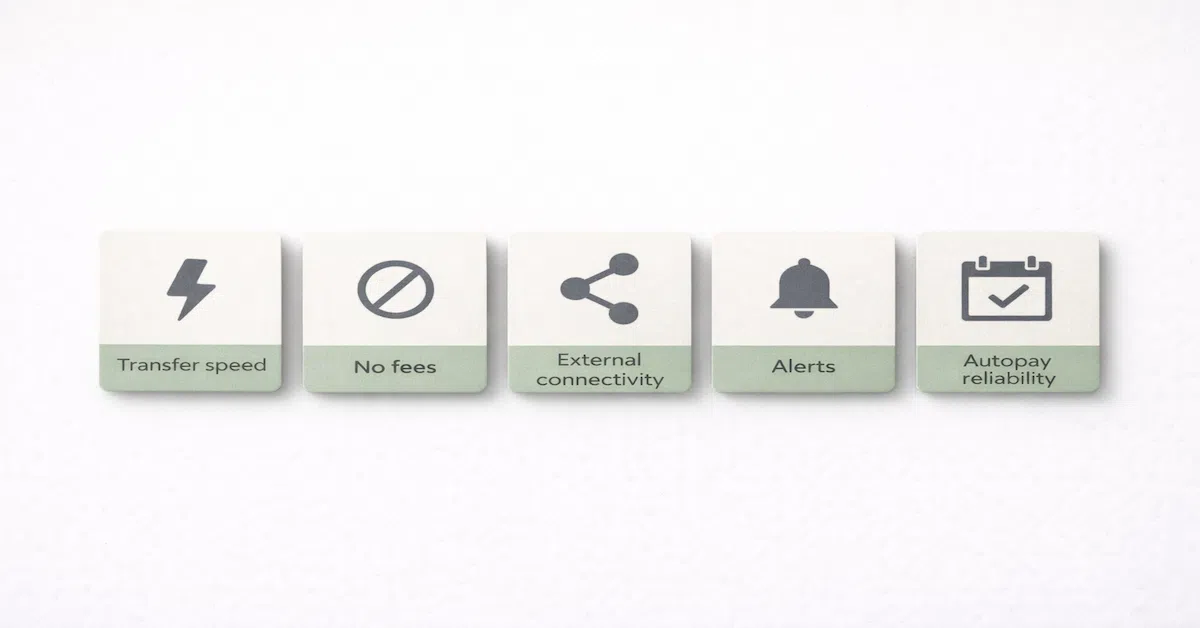
— The features that matter for automation are transfer speed, fee structure, external account connectivity, alert capabilities, and autopay reliability — not ATM density or branch hours.
— Transfer speed is the most critical variable — a bank with slow external ACH transfers creates timing gaps that cause automation failures regardless of how well everything else is configured.
— No-fee checking is non-negotiable — monthly maintenance fees and minimum balance requirements add ongoing cost to a system designed to reduce friction, not create it.
— You need at least two institutions in an automated system: one for operational accounts and one for savings — evaluate them against different criteria because they serve different functions.
Most people choose their bank the way they choose most things they have always had — they inherited it from a parent, opened an account near their first apartment, or went with whatever institution their employer used for payroll. The bank was never evaluated against any specific criteria because the criteria were never considered.
That approach works adequately for passive banking. It is actively problematic for automated banking. The features that determine whether a bank supports financial automation reliably have nothing to do with brand recognition, branch proximity, or the sign-up bonus that attracted the original account opening. They are operational features that most people have never thought to compare.
The best bank features for automation fall into five categories. Here is what to evaluate in each one before building any automated system on top of a financial institution.
Feature 1: Transfer Speed
Transfer speed is the most important bank feature for automation and the one most commonly overlooked. In an automated system, transfers need to execute when they are scheduled — not two to five business days after the schedule says they should fire.
Same-institution transfers: Transfers between accounts at the same bank should be instantaneous or same-business-day. If your bills account and spending account are at the same bank and a transfer between them takes two days, the entire timing structure of your automation is unreliable. Instant same-institution transfers are a baseline requirement, not a premium feature.
External ACH transfers: Transfers between accounts at different institutions use the ACH network, which historically took two to three business days. Many banks now offer same-day or next-day external ACH on outgoing transfers. The difference matters: a payday-triggered savings transfer that takes three days to arrive at a separate-institution savings account leaves a three-day window where that money is in transit and unavailable. Next-day ACH eliminates most of that exposure.
What to look for: Instant internal transfers, next-day external ACH for outgoing transfers, and real-time balance updates after transactions post. Call the bank or check their deposit account agreement before opening — marketing pages often describe speed optimistically.
Feature 2: Fee Structure
Every fee in an automated system is a structural friction point. Monthly maintenance fees require a minimum balance condition that may conflict with how the account is being used. Overdraft fees punish timing mismatches that automation cannot prevent without adequate buffers. ATM fees penalize cash access from the spending account. Each fee category adds cost and complexity to a system designed to reduce both.
Monthly maintenance fees: The correct answer for an automated system is zero. Any monthly fee on a checking account — even one that is waivable with a minimum balance — creates a constraint that may conflict with how the account is used in the automated structure. A bills account funded to exactly cover the month's obligations may fall below a minimum balance requirement when bills post mid-month. The fee fires. The buffer erodes. No-fee checking with no minimum balance requirement is the baseline.
Overdraft fees: The best banks for automation have eliminated or dramatically reduced overdraft fees, or allow you to opt out of overdraft coverage entirely so transactions decline rather than generating fees. A bank that still charges $35 per overdraft occurrence is incompatible with a system that requires timing precision that no automation can guarantee perfectly.
Transfer fees: Internal transfers should be free. Incoming ACH transfers should be free. Outgoing ACH transfers should be free. Any bank that charges for standard electronic transfers between accounts adds ongoing cost to every automated action in the system.
Feature 3: External Account Connectivity
An automated system typically spans two institutions: a primary bank for operational accounts and a separate bank for savings. These two institutions need to communicate reliably for transfers to execute. The quality of a bank's external connectivity determines how smoothly that communication happens.
External account linking: The bank should support linking external accounts via routing and account number with micro-deposit verification that completes within two to three business days. Some banks require weeks to verify external accounts or impose restrictions on the number of external accounts that can be linked. Both create friction in setting up the automated system.
Transfer limits: Many banks impose daily and monthly limits on external transfers. A bank with a $500 daily external transfer limit creates problems if your biweekly savings contribution is $600. Verify transfer limits before choosing an institution — they are often buried in the deposit account agreement rather than featured in marketing materials.
Plaid and open banking connectivity: Many financial apps and automation tools use Plaid or similar services to connect accounts across institutions. A bank that restricts or blocks these connections limits the ability to monitor the automated system from a single dashboard. While not essential for the automation itself, connectivity to aggregation tools significantly simplifies oversight.
Feature 4: Alert and Notification Capabilities
Automation reduces the need to actively monitor accounts but does not eliminate it. The bank's alert system is what allows passive oversight — you get notified when something requires attention rather than checking manually every day.
Low-balance alerts: The ability to set a custom balance threshold alert is essential. When the bills account drops near the buffer floor, you need to know before a bill posts and finds insufficient funds. When the spending account approaches the spending minimum, you need to know before the next purchase causes a problem. Banks that only offer generic alerts or limited threshold customization make passive oversight significantly harder.
Transaction alerts: Real-time transaction notifications allow you to catch charges that do not belong in an account immediately — a bill that autopaid from the spending account instead of the bills account, a subscription that renewed for a higher amount than expected, or an unfamiliar charge. Immediate notification means the problem is caught the day it occurs rather than on the next monthly review.
Transfer confirmation alerts: Confirmation that a scheduled transfer executed successfully closes the feedback loop for automation. Without it, you cannot distinguish a transfer that ran on schedule from one that failed silently. The best banks send both a scheduled-transfer reminder the day before execution and a confirmation alert the day it posts.
Feature 5: Autopay Reliability and Bill Pay Tools
The bills account's entire function depends on autopay working correctly. A bank whose autopay system processes payments unreliably, delays posting, or has limited biller connectivity is a structural problem for any automated system built around it.
What to evaluate: Does the bank offer a bill pay platform that allows scheduling recurring payments to billers who do not offer autopay directly? Does it process autopay debits initiated by billers on the scheduled date rather than one to two days late? Can you view pending autopay charges before they post to monitor upcoming activity?
The savings account exception: The savings account at a separate institution is evaluated against different criteria than the operational accounts. For the savings institution, the key features are competitive interest rate, no fees, no minimum balance requirement, and the one to three day transfer window that creates protective friction. Transfer speed at the savings institution should be moderate, not instant — instant transfers to savings eliminate the friction that makes the account structurally protective.
Evaluating Your Current Bank Against These Criteria
Before switching banks, evaluate your current institution against the five criteria honestly. Many people discover their current bank is adequate for operational accounts but charges fees that are easy to eliminate by switching. Others find their savings account earns negligible interest and is at the same institution as checking, eliminating the protective friction the separate-institution structure requires.
The most common finding: current primary bank is acceptable for bills and spending checking with no fees and adequate transfer speed, but the savings account needs to move to a separate institution with a competitive interest rate. That single change — moving savings to a different bank — addresses both the interest rate and the structural friction issues without requiring a complete banking overhaul.
The right bank makes automation reliable. The complete system makes it powerful.
Once your banking infrastructure supports automation, the Financial Automation hub shows you how to build budget automation, savings systems, debt payoff, and investment contributions on top of it.
Explore the Financial Automation Hub →More From Banking Infrastructure for Automation
The 3-Account System That Fixes Money Chaos — The complete framework: which accounts to open, where they live, and how money flows between them
Bills Account vs Spending Account: The Correct Setup — The exact configuration for each account and how to keep them from bleeding into each other
Where Your Paycheck Should Land First — The income landing account strategy that makes every automated transfer fire correctly
How to Build a Buffer Account That Prevents Overdrafts — The cash cushion that keeps automation running when timing does not align perfectly
You are here: Best Bank Features for Automation
How to Set Up Your Bank Accounts So Money Moves Without You — Step-by-step account configuration for a fully hands-off money flow
The Right Number of Bank Accounts for Full Automation — How many accounts you actually need and when adding more helps versus hurts
Why Your Checking Account Is Sabotaging Your Automation System — The specific checking account errors that silently break every automated system
Resources
CFPB — Bank Account Consumer Tools and Resources
FDIC — Consumer Protection and Deposit Insurance
FDIC BankFind — Verify Institution Insurance Status
This article is part of the Financial Automation hub on PersonalOne — a complete framework for building financial systems that run without daily decisions.
Frequently Asked Questions
Should I use the same bank for all my accounts?
For operational accounts — bills checking and spending checking — same institution is recommended for instant internal transfers. For savings, a different institution is specifically recommended because the transfer delay creates protective friction. The standard configuration is one primary bank for both checking accounts and one separate online institution for the high-yield savings account.
Are online banks safe for an automated system?
Yes, provided they are FDIC-insured. Online banks are frequently better suited for automated systems than traditional banks because they typically offer no-fee checking, competitive savings rates, faster external transfers, and better digital tools. Verify FDIC insurance status through the FDIC BankFind tool before opening any account.
What if my current bank does not support all these features?
Identify which features are missing and how significantly they affect automation reliability. Missing low-balance alerts can be worked around with more frequent manual checking. Slow external transfers can be accommodated by scheduling transfers further in advance. Monthly fees cannot be avoided unless the waiver condition is consistently met. Start with the highest-impact gap and address it first rather than switching everything at once.
How do I switch banks without disrupting my automated transfers?
Keep the old account open and active for 60 to 90 days while transitioning. Redirect direct deposit to the new account first. Migrate autopay bills one at a time, confirming each one before moving the next. After two full billing cycles have cleared at the new institution with no stragglers at the old one, close the old account in writing and request written confirmation of closure.
Disclaimer: This content is for educational purposes only and does not constitute financial advice. Bank features, fees, transfer speeds, and policies change over time. Always verify current terms directly with any financial institution before opening accounts or making banking changes. FDIC insurance covers up to $250,000 per depositor per institution — verify coverage before depositing funds.