Updated: August 9, 2026
Home › Financial Automation › Banking Infrastructure for Automation › Why Your Checking Account Is Sabotaging Your Automation System
What You Need to Know
— Most automation failures originate in the checking account — specifically in the way it is configured, what it is asked to do, and what protections it lacks.
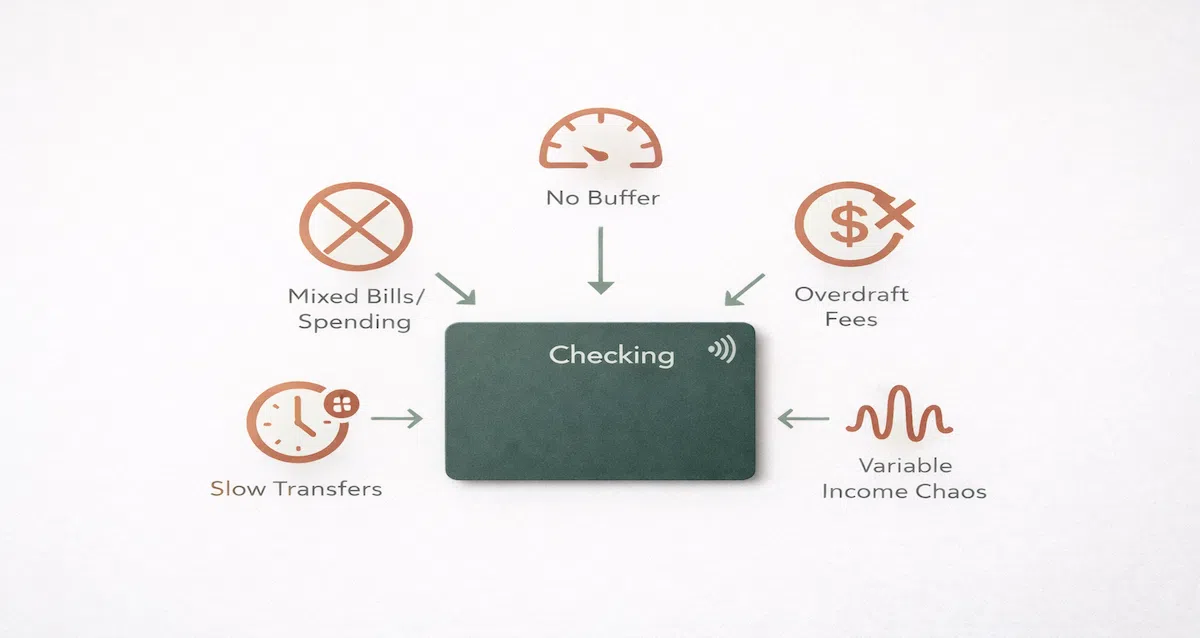
— The five most common checking account sabotage patterns are: serving as both bills and spending account simultaneously, carrying no buffer, having overdraft protection enabled, being at a bank with slow transfer speeds, and being used as an income buffer for variable earners without the structure to support that role.
— Each pattern is fixable with a specific structural change — not a behavioral change, not more discipline, not a different budgeting app.
— The checking account problems in this article are responsible for more automation failures than any other single factor in the system.
— Identifying which pattern applies to your situation and making the structural fix is more productive than trying to optimize around a fundamentally broken foundation.
When an automated money system fails repeatedly — overdrafts that should not happen, transfers that misfired, bills that paid from the wrong account, a spending balance that never seems accurate — the first place to look is almost always the checking account. Not the savings account. Not the transfer schedule. Not the investment account. The checking account.
This is because the checking account is where the highest volume of automated activity happens. Bills draw from it. Transfers originate from it. The debit card connects to it. Income lands in it. In a system where every automated action traces back to the checking account in some way, checking account errors amplify rather than stay contained. A single misconfiguration produces failures across multiple automated flows simultaneously.
Understanding the checking account errors sabotaging your automation is the diagnostic starting point for every automation failure that does not have an obvious external cause. Here are the five most common patterns and the specific fix for each.
Sabotage Pattern 1: One Account Serving Two Jobs
What it looks like: Bills autopay from the same account you use for daily spending. The balance you see includes money already claimed by upcoming autopayments. Spending decisions are made against a misleading number and occasionally produce overdrafts when a bill posts on the same day as a discretionary charge.
Why it causes automation failure: Automation cannot dynamically adjust for the fact that the same pool of money is serving two purposes simultaneously. When a $200 utility bill and a $180 grocery run both draw from an account that had $350, one of them triggers an overdraft. Neither charge was unreasonable. The problem was structural — two distinct money jobs competing for one account balance.
The fix: Open a second checking account at your primary bank dedicated exclusively to bills. Migrate all fixed bill autopay to it. Fund it on payday via automated transfer. Never use it for discretionary spending. The spending account now shows only genuinely available money. Bills account handles only obligations. The competition disappears because the money is separated before any spending decision is made.
Sabotage Pattern 2: No Buffer in the Account
What it looks like: The checking account is funded to exactly what is needed for the current period. When a bill posts one day before the funding transfer arrives, or when a forgotten subscription renews, the account goes negative. A $35 overdraft fee posts. The next autopayment bounces because the account is already negative from the fee. The cascade begins.
Why it causes automation failure: Automation is not precise. Billing dates shift by one to two days around weekends and holidays. Deposits post at slightly different times depending on how the payroll processor releases funds. A system with no tolerance for these small variations fails every time real-world timing deviates from the ideal schedule — which is routinely.
The fix: Maintain a permanent cash buffer in every account that automated transfers draw from. Bills account buffer: 10 to 15 percent of monthly fixed obligations. Spending account buffer: $100 to $200 treated as mental zero. These buffers absorb timing variance without producing overdrafts. They are not savings. They are infrastructure that lives in the account permanently.
Sabotage Pattern 3: Overdraft Protection Enabled
What it looks like: The bank allows transactions to process even when the account balance is insufficient, and charges a $35 fee for each one. What feels like protection is actually the mechanism that turns a $15 timing gap into a $50 problem — or a $150 problem if three transactions post while the account is negative.
Why it causes automation failure: Overdraft protection creates a feedback loop where the automation appears to be working — transfers and autopayments are all processing — but the account is silently accumulating fees. The system is not failing visibly. It is failing expensively. Monthly fee totals erode savings contributions and spending allocations without any single dramatic event to draw attention to the problem.
The fix: Opt out of overdraft coverage on the spending account. A declined transaction costs nothing. A covered transaction costs $35. With adequate buffers in place, the account should rarely if ever be in a position where a transaction needs to be declined for insufficient funds. Without adequate buffers, declined transactions are the signal that the buffer is insufficient — a useful piece of information that overdraft coverage silences by covering the problem while charging for it.
Note: overdraft protection linked to a savings account at the same institution is different from fee-based overdraft coverage. The savings account link transfers from savings to checking automatically to cover a shortfall without a fee. This is a more reasonable configuration as long as the savings account has funds to cover the transfer.
Sabotage Pattern 4: Bank With Slow Transfer Speeds
What it looks like: External transfers take three to five business days to post. A payday savings transfer initiated Thursday does not arrive at the savings institution until Tuesday of the following week. Meanwhile, the spending account balance still shows the pre-transfer amount and spending happens against it. When the transfer finally posts, it draws the account lower than expected and triggers a low-balance alert or an overdraft.
Why it causes automation failure: Slow transfer speeds create a permanent mismatch between the balance the automation system assumes exists and the balance that actually exists. Every automated transfer scheduled around a slow-transfer bank introduces timing uncertainty that only resolves by waiting and hoping nothing draws from the account during the five-day transit window.
The fix: Evaluate the actual transfer speed your bank provides before building automation around it. If external transfers consistently take three or more business days, the bank is poorly suited for a multi-institution automated system. Moving to a bank with next-day or same-day external ACH capability eliminates the transit uncertainty. If switching banks is not immediately practical, schedule transfers further in advance of when the funds are needed and maintain larger buffers to absorb the extended transit period.
Sabotage Pattern 5: Using Checking as an Income Buffer Without Buffer Architecture
What it looks like: Variable income lands in the spending checking account at irregular intervals and in irregular amounts. Automated transfers are configured for fixed amounts on a fixed schedule. In months when client payments arrive late or below average, the automated transfers fire against insufficient funds. Overdrafts result. The system breaks.
Why it causes automation failure: A standard spending checking account is designed to hold one pay period's spending allocation and distribute it as spent. It is not designed to absorb income variability, hold multiple periods of reserves, or serve as a buffer between irregular income and regular outgoing transfers. Using it for that role without the architecture to support it produces exactly the failures you would expect from asking an account to do something it was not designed for.
The fix: Variable income earners need a dedicated income buffer account as the income landing zone — separate from both the spending account and the bills account. All variable income deposits into the buffer. On a fixed schedule, a consistent amount transfers from the buffer to the spending account (and bills allocation transfers from there). The buffer absorbs the variability. The checking account sees only consistent inflows and operates as intended. The buffer needs to hold one to two months of total outgoing transfers before the automated schedule launches.
Diagnosing Your Own Checking Account
If your automation is failing or feels unreliable, apply these five patterns as a diagnostic checklist. Most automation failures involve exactly one of these five problems. Identifying which one eliminates the speculation and points directly to the structural fix required.
Automation Failure Diagnostic
Overdrafts from autopay and spending conflicts: Pattern 1 — separate bills and spending into two accounts.
Overdrafts from billing or timing surprises: Pattern 2 — build a buffer in the bills account.
Fees accumulating silently despite system appearing to work: Pattern 3 — opt out of fee-based overdraft coverage.
Balance discrepancies during transfer transit windows: Pattern 4 — evaluate bank transfer speed and add buffer or switch banks.
Automation failures during low-income months (variable earner): Pattern 5 — build a dedicated income buffer account before relaunching automation.
Fix the checking account. Then build the rest of the system on solid ground.
The Financial Automation hub covers every layer that goes on top of a correctly configured checking account — budget automation, savings systems, debt payoff, and investment contributions.
Explore the Financial Automation Hub →More From Banking Infrastructure for Automation
The 3-Account System That Fixes Money Chaos — The complete framework: which accounts to open, where they live, and how money flows between them
Bills Account vs Spending Account: The Correct Setup — The exact configuration for each account and how to keep them from bleeding into each other
Where Your Paycheck Should Land First — The income landing account strategy that makes every automated transfer fire correctly
How to Build a Buffer Account That Prevents Overdrafts — The cash cushion that keeps automation running when timing does not align perfectly
Best Bank Features for Automation — What to look for in a bank before you build your automated system on top of it
How to Set Up Your Bank Accounts So Money Moves Without You — Step-by-step account configuration for a fully hands-off money flow
The Right Number of Bank Accounts for Full Automation — How many accounts you actually need and when adding more helps versus hurts
You are here: Why Your Checking Account Is Sabotaging Your Automation System
Resources
CFPB — Bank Account Consumer Tools and Resources
CFPB — Overdraft and NSF Fee Research Data
FDIC — Consumer Protection and Deposit Insurance
This article is part of the Financial Automation hub on PersonalOne — a complete framework for building financial systems that run without daily decisions.
Frequently Asked Questions
How do I know which of the five patterns is causing my automation failures?
Pull three months of bank statements and look for the pattern of failures. Overdrafts that always involve a combination of an autopay and a purchase point to Pattern 1. Overdrafts that occur despite the account being funded to cover all known charges point to Pattern 2 or 4. Fee accumulation without obvious individual failure events points to Pattern 3. Failures that correlate with months of lower-than-average income point to Pattern 5. Most failures cluster clearly around one pattern when the statements are reviewed together.
Can I fix these problems without switching banks?
Patterns 1, 2, 3, and 5 can all be fixed without switching banks — they require account configuration changes and structural additions rather than institution changes. Pattern 4 (slow transfer speeds) may require switching if the bank's ACH speed is fundamentally slow and cannot be accommodated through scheduling adjustments and larger buffers. Evaluate whether the transfer speed issue is causing real failures before deciding a switch is necessary.
What if I have more than one of these patterns?
Address them in order of impact. Pattern 1 (single account for bills and spending) typically has the highest impact and should be fixed first because it affects the foundation everything else relies on. Pattern 2 (no buffer) is the second highest priority because it affects every automated flow in the system. Patterns 3, 4, and 5 can be addressed after the first two are resolved. Fixing Pattern 1 and Pattern 2 together resolves the majority of automation failures for most people.
My automation was working fine for six months and then started failing. What happened?
The most common causes of previously stable automation beginning to fail are: a bill amount that increased and the funding transfer was not updated to reflect it (depletes the buffer over time until a failure occurs), a new subscription added to the spending account that should be in the bills account, income that decreased and the fixed transfer schedule now draws more than the account reliably holds, or a bank policy change affecting transfer timing or overdraft handling. Review the five patterns against recent activity to identify which one changed.
Disclaimer: This content is for educational purposes only and does not constitute financial advice. Banking policies, overdraft rules, and transfer capabilities vary by institution and change over time. Always verify current terms with your bank or credit union before making changes to your account configuration or automation setup.